Guardian Alliance Technologies
Release notes

Release notes

Updated May 28, 2026

May 2026

May 28, 2026

Secure PDF Handling Update

We've made a small but important change to how certain PDF files are accessed in Guardian. Going forward, some files will download to your computer instead of opening directly in your browser.

This affects files that originate from outside Guardian — including Supervisor Only files, Document Library PDFs, inbound faxes and emails, vendor reports, and ID Report exports. Files generated by Guardian directly are not affected.

This change helps protect your account and your agency's data by eliminating a potential security risk associated with viewing certain PDF files while you're logged into Guardian. No action is required on your part.

May 15, 2026

California POST — Investigation & narrative alignment

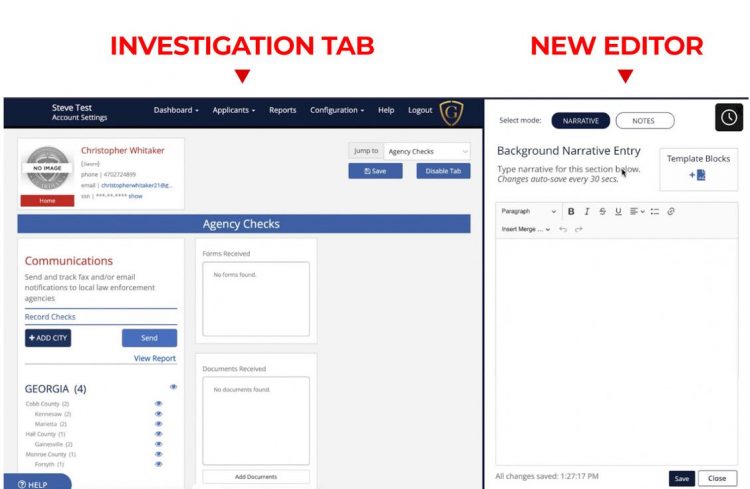
Guardian has released a new update for California POST agencies, focused on aligning the background investigation experience and the final narrative report more closely with the official California POST template.

These changes make it easier to produce compliant, audit-ready reports without extra formatting work on your part. The investigation tabs, narrative entry points, and the ID Report and PDF output have all been updated to follow the structure that auditors expect to see — and Guardian handles the sorting and formatting automatically as you work.

Here's a quick look at what's included:

  • Background Narrative Report alignment — The online ID Report and PDF now follow the official California POST template's section order and naming.
  • Updated tab names and order — Investigation tabs have been renamed and rearranged to match California POST language and flow.
  • Multi-narrative tab support — A few tabs now contain multiple narrative entry boxes so each one maps directly to the correct section of the final report.
  • New per-position flexibility — Choose the investigation format (Guardian Default or California POST) on a position-by-position basis, rather than agency-wide. You can apply the California POST format to sworn positions and keep Guardian Default for non-sworn if that fits your operations.
  • No manual setup required — Guardian automatically routes your narrative content into the correct sections in both the online and PDF reports.

Want to see it in action or dive into the details?

If your agency hasn't enabled California POST mode yet, contact our support team at support@guardianalliancetechnologies.com and we'll get you switched over so you can take advantage of these updates.

May 07, 2026

Improved Investigation Duration History

The ID Report now includes a clearer breakdown of how long an investigation has spent in the Triage Center, Investigation Center (assigned and unassigned), and the Archive. This gives agency users a better view of the investigation timeline.

HR Added as a Contact Relationship Type

Investigators can now select HR as a contact relationship type when adding a contact from the Employment History tab. This makes it easy to document outreach to an employer's Human Resources department, including public safety agencies where an applicant previously worked.

HR contacts come with their own email and form templates, which you can customize to capture exactly the information you need.

Improved Security for Account Recovery Information

Guardian now requires users to enter their current password when updating a recovery email address or phone number. Once the password is confirmed, Guardian sends a verification code to the new email or phone, and the change takes effect only after both steps succeed. This adds an extra layer of protection for account recovery information.

Improved Landlord Information Collection in the PHQ

The PHQ residency section has been updated to make owner, landlord, or rent-collector information easier to manage.

Applicants who rented a residence will now be asked whether they have an owner, landlord, or rent-collector to list. If they do, they can add that contact information separately from the residency entry. If they do not, they can provide an explanation.

This keeps residency details cleaner and gives investigators better information for follow-up when needed.

PHQ: Multiple Contacts per Residential Entry

The Residential History section now lets applicants add multiple owners, landlords, or rent collectors for a single residence. Previously, only one contact could be entered per residence. Now applicants can capture every relevant party tied to where they've lived.

Help Center Links

When a user opens a link to a login-protected Help Center article without being signed in, Guardian now takes them directly to the article after they log in. Previously, users were redirected to their Guardian dashboard and had to navigate back to the article on their own. This gets users to the support information they need with fewer steps.

April 2026

April 23, 2026

UPDATES FOR CA POST AGENCIES ONLY

We want to make sure your background investigations are as easy—and as compliant—as possible. To help your agency stay aligned with CA POST standards, we’ve updated the Guardian PHQ (CA POST 2-251 version only).

RELEASING APRIL 23, 2026

Don’t Want to Read?

Watch the video and learn more about this week’s release, as well as a sneak-peek of more CA POST related changes coming soon!

WATCH NOW >

What’s changing in the PHQ?

  • Removal of Questions: We’ve trimmed the Personal History Questionnaire to include only the questions required by the official CA POST form.
  • Verbiage Updates: We’ve modified a small handful of question/instruction verbiage to better align with the CA POST 2-251

FULL DETAILS OF CHANGED QUESTIONS

You can review the full breakdown of these CA POST updates and tab changes here:

👉California POST Compliance Update Details

Sneek-peek at upcoming changes releasing soon!

  • New CA POST Narrative (Coming Soon!): Narrative output for ID Reports (including PDF version) will now be automatically organized to match the official CA POST Narrative layout to meet auditor expectations.
  • Investigation Tab Updates (Coming Soon!): Investigation tabs have been renamed and reorganized to more closely match the order and names recommended by CA POST.

Learn more about the Narrative and Tab Changes in the Release Note Details

👉California POST Compliance Update Details

March 2026

March 11, 2026

General Platform Improvements

We are rolling out several “Spring Cleaning” updates to the Guardian interface designed to make daily work smoother and more efficient for agency users.

  • Enhanced Readability: Updated text colors and higher contrast across all pages to meet accessibility standards.
  • Intuitive Navigation: Refined button colors that reserve red for critical warnings, making it easier to identify urgent actions.
  • Refined Layouts: Polished Personnel Management and Template Editor pages for a cleaner, professional look.

You can review the full breakdown of these changes and see the “Before and After” examples here:

Spring Cleaning Interface Updates

February 2026

February 19, 2026

Quick Look

We’re rolling out a new Guardian release this weekend, and it’s a big one! This release focuses on saving investigators time with ready-to-use narrative and form templates, while also delivering a handful of meaningful fixes that clean up some long-standing workflow friction points.

What's New

  •  Default  Narrative Templates – Ready-to-use templates now appear in the Narrative Summary editor, saving investigators significant time on write-ups.
  • Default  Form Templates – Pre-Built  supplemental form layouts so agencies aren’t starting from scratch.
  • CA-POST Checklist Upload – CA POST agencies can now upload a completed POST Checklist directly to an investigation file.
  • Approval Ladder Flexibility – Agencies can now use the Approval Ladder for any properly configured outcome, rathe than requiring all three (Hire, DQ, Withdraw) to be set up first.

Fixes & Improvements

  • PHQ numbering now updates dynamically when questions are hidden – no more placeholder gaps.
  • Hidden follow-up questions in the Investigator PHQ review no longer incorrectly appear.
  • Changes Tracking no longer displays other agencies’ names on certified PHQs when comparing answers to shared questions.
  • Reference Forms now capture and display IP addresses, with duplicate submission flagging.
  • Various smaller fixes to PHQ notifications, “View Section” navigation and Form Management display.

Review Full Release Notes

Be sure to check out the release notes so you can get caught up to speed on the latest updates!

December 2025

December 06, 2025

Featuring the New Agency Checks!

We’re rolling out a new Guardian release this weekend, and it’s a big one!

The key update is the overhauled Agency Checks experience, giving investigators clearer visibility, easier management of agencies, and a much smoother workflow for tracking responses nationwide.

This release also includes multiple improvements across the platform, including Applicant Portal enhancements, Investigator tools, and general quality-of-life fixes.

Get up to speed!

Agency Checks Overview Video.  Brought to you from our CTO / Director of Product Development, walking through the new Agency Checks experience.

Review the full release notes for all updates in this release.

September 2025

September 25, 2025

Overview

We’re excited to announce a new release going live this Thursday, September 25. This update focuses on quality-of-life improvements across the platform, making day-to-day work smoother and more efficient. Highlights include better logging and transparency in the Investigation Journal, improved PHQ and applicant workflows, smarter validation and security updates, and several UI fixes that make navigation clearer.

Read on for more details!

September 04, 2025

This release brings expanded options for documenting polygraph/voice analysis results and a major upgrade to the Personal History Questionnaire (PHQ). These updates improve compliance, give investigators better tools, and put more control into the hands of your agency.

Polygraph / CVSA / EyeDetect Updates

We’ve greatly expanded the examination result options to allow for more detailed and accurate logging, aligning with common nationwide examiner terminology.

Questionnaire / PHQ Updates

We’ve added over 40 new questions and modified many others for better clarity and to meet TCOLE (Texas) compliance and those requested for Fire Dept. investigations. Agencies will have full control to enable these new questions when they are ready.

REVIEW FULL LIST OF PHQ CHANGES HERE

Action Required: Enabling New Questions

Click here to review the instructions your agency must follow to enable the new PHQ questions.

July 2025

July 19, 2025

This month, we put a major focus on revamping our reporting suite to give you clearer, more powerful, and more actionable data. We’ve introduced a brand-new report and added powerful new filtering capabilities across the board.

Read More Here

Check out ALL of Guardian’s Reports!

If you haven’t explored all the reports Guardian provides, check out our Agency Reports document, which details the functionality of each report and provide your agency with some valuable insights!

View Guardian Agency Reports Guide

Investigation Updates

This release introduces several key updates to the investigation process, focusing on giving investigators more control, better data, and a cleaner interface to work with.

Read More Here

Applicant and PHQ Updates

This release includes two key updates focused on improving the quality of information you receive from the applicant’s Personal History Questionnaire (PHQ) and the notifications related to it.

Read More Here

June 2025

June 26, 2025

Questionnaire Manager / PHQ Update

Agency users now have the ability to hide all questions in the PHQ. The only questions that remain mandatory are in Section 01. This provides agencies with greater control and flexibility, allowing them to simplify the applicant experience and tailor the questionnaire to meet their specific job position needs. Mandatory Section 01 Questions Question # Question Text

1 Personal Information (Last Name, First Name, Middle Name)

3 Current Home Address

5 Contact Number

6 Contact Email

9 Birthdate

10 Social Security Number

11 StateID / License

Existing Questionnaires: All questions that were previously mandatory will remain visible in all questionnaires. An agency user may elect to edit a questionnaire at any time by hiding a previously mandatory question then publishing the new questionnaire.

PHQ Update: Grouped Hidden Questions

When multiple hidden questions appear in a row in the PHQ, the system now displays a single, grouped message instead of repeating the same notice for each question.

For example, if questions 4 through 8 are all hidden, the current PHQ shows:

  1. This question is not applicable for this position. Please proceed to the next question.
  2. This question is not applicable for this position. Please proceed to the next question.
  3. This question is not applicable for this position. Please proceed to the next question.
  4. This question is not applicable for this position. Please proceed to the next question.
  5. This question is not applicable for this position. Please proceed to the next question.

The above scenario will now display to the applicant as a single line:

4 – 8: These questions are not applicable for this position. Please proceed to the next question.

This improvement simplifies the display, reduces clutter, and creates a cleaner, more streamlined experience for applicants as they move through the questionnaire.

Miscellaneous Updates

  • Mobile Update (Applicant): The spacing issue that caused buttons to overlap in the Notice popup on mobile devices has been fixed. Buttons now display correctly with clear, accessible spacing, making it easy for applicants to navigate and complete actions without confusion
  • Mobile Update (Applicant): The “Congratulations!” title on the final registration page now displays correctly in the center on mobile devices, providing a cleaner, more polished onboarding experience.
  • PHQ: Section 01 – Question 12 (Physical Description): The PHQ now correctly accepts decimal values in the weight field, allowing applicants to provide more precise and accurate information without formatting errors.
  • Applicant Portal – Form Submission: The “Send to Investigator” button in Online Forms is now properly center-aligned on mobile devices, providing a cleaner, more professional layout and improving button accessibility for applicants.
  • Investigation Details – Dimension Editing: Fixed a bug related to some users inability to edit or remove a dimension once added.

June 05, 2025

PHQ Enhancements & File Share Update

We’re excited to announce several enhancements to the Guardian platform, deploying on Thursday, June 5, 2025. These updates focus on improving the Personal History Questionnaire (PHQ) functionality for both agencies and applicants, and adding a new convenience feature to File Share.

Personal History Questionnaire (PHQ) Enhancements

We’ve made significant updates to the PHQ to offer more flexibility for agencies and provide clearer guidance for applicants.

Configurable Reference Minimums for Agencies

Previously, the PHQ required a standard minimum of six applicant references. Understanding that agency needs vary, we’ve introduced a new configuration option:

Agency supervisors can now set a custom minimum number of character references required for Section 2, Question 7 (Character References) directly within the Questionnaire Manager.

An edit/gear icon will now appear next to Question 7 in Section 2 within the Questionnaire Manager. Clicking this will open a modal where you can select a minimum number of references from 0 to 12. The default will remain 6 references if no changes are made.

The instructional text visible to applicants for this question will dynamically update to reflect the minimum number your agency has set (e.g., “List at least 4 people who know you well…”). The system will enforce this new minimum before an applicant can finalize the section.

This allows your agency to align the PHQ reference requirement directly with your internal policies without needing to contact support.

New and Updated PHQ Questions

To ensure comprehensive data collection and meet evolving standards, the following questions have been added or their instructions updated.

Visibility Note for Agencies: If your agency uses Questionnaire Manager (QM) to customize PHQs, new questions will default to hidden in your current Questionnaires. If you would like to display these questions to your applicants, simply visit the Questionnaire Manager and edit the questionnaire by setting the visibility of the new question to ON/Visible.

Section 1: Personal Information

        NEW Question (Q1 – Suffix): An optional “Suffix” field (e.g., Jr., Sr., II, III, IV) has been added to the right of the “Middle Name” field.

Section 2: Relatives & Personal Associates

NEW Question (Q8): “Is any member(s) of your family now in prison or on either probation or parole?”

If “Yes,” an explanation is required, including: Relationship, Full Name, Nature of Offense, Current Status, and Date/Location of                                       Incarceration/Supervision.

Section 3: Education

          Question 5.1 (Updated Question Text): The question regarding disciplinary actions has been updated to: “Have you ever been subject to                  any disciplinary action, including academic probation, civil fine, suspension, or expulsion from any high school(s), college/university,                              business, trade school, POST basic course/academy, or law enforcement academy?”

                 – Change: “or law enforcement academy” was added.

Section 5: Employment

NEW Question (Q3.12): “Have you ever had a conditional offer of employment rescinded for any reason from any employment where the                  position required certification or licensing of any sort?”

NEW Question (Q10): “Have you ever held a position that required certification or licensure from any commission, board, or agency                            established to certify or license that position?”

Child Question 10.1 (displays if “Yes” to Q10): “Has such certification or license ever been surrendered, suspended, revoked, or                                     otherwise sanctioned by the issuing authority?

      –  If “Yes” to 10.1, an explanation is required, including: Agency Name, Date of Action, Reason, and Duration.

Section 8: Legal

The instructions for Questions 2 and 3 have been updated to include the word “charges” in the examples provided in the “Note”.

Question 2 (Instructions Updated): The introductory instructions now read:

“At any time in your life, have you ever committed any of the following acts? NOTE: You may not withhold any information regarding your involvement in any of the following acts, even if federal or state law relieved you from reporting the detention, arrest, charges, or conviction that arose from it.”

Question 3 (Instructions Updated): The introductory instruction and note now read:

“At any time in your life, have you EVER committed any of the following acts? NOTE: You may not withhold any information regarding your involvement in any of the following acts, even if federal or state law relieved you from reporting the detention, arrest, charges, or conviction that arose from it.”

Section 10: Travel

NEW Question (Q1.3): “Have you ever been detained, charged, arrested, indicted, or convicted of any crime while traveling or residing outside of the United States?”

Enhanced Applicant Notifications for PHQ Changes

To reduce applicant confusion PHQ Questionnaires are modified:

Applicants who have already started their PHQ will receive clear, in-app notifications if changes are made to their questionnaire (e.g., a question is added, modified, hidden, or unhidden by Guardian or your agency).

Each notification will specify the type of change, the agency name, the affected Section and Question number, clear instructions on the action required, and a direct “View Section” link.

This provides applicants with precise guidance on what needs their attention, ensuring they can complete or update their PHQ accurately.

File Share: Update

We’ve added a feature to the File Share section to improve your record-keeping capabilities:

Secondary Dissemination Log – CSV Export: You will now find an “Export to CSV” button on the Secondary Dissemination Log table. This allows you to easily download a CSV file of the log, which can be helpful for auditing purposes or external data management.

February 2025

February 20, 2025

Agency Staff: Extended Permissions

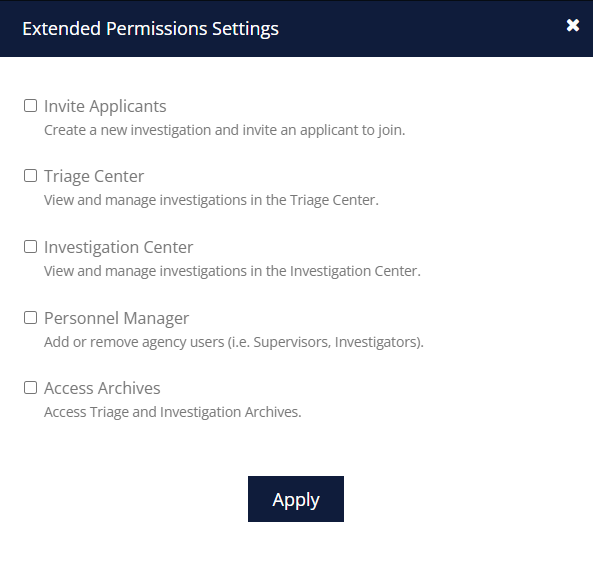
Agencies can now customize staff access with expanded permissions, allowing greater flexibility in defining staff roles while maintaining security and operational control. By default, all extended permissions remain disabled, ensuring agencies have full control over which functionalities their staff can access.

Extended permissions include:

Agency extended permission settings

January 2025

January 30, 2025

Support Ticket Validation Fix

The “Create Support Ticket” form now properly enforces required fields, preventing empty spaces from being accepted, ensuring accurate submissions for better issue resolution.

Triage Center: Clear Filters Fix

The “Clear” button in the Triage Center now properly resets the “Tags” and “Classifications” filters, ensuring accurate filtering and a smoother user experience.

Supervisor Dashboard

 The “Triage Center” information card will no longer appear on the Supervisor Dashboard for Supervisor users who do not have the required Triage permissions, ensuring proper access control and a more streamlined interface.

Applicant Invite: Timestamp Update

The “Last Invite” timestamp now updates correctly after re-inviting an applicant, ensuring accurate tracking and improved applicant management.
Agency Reports: Job Position & Classification Filters

Filtering reports by both Job Position and Classification simultaneously now works correctly, ensuring accurate data retrieval and improved report customization.

January 23, 2025

Relatives/References: Easily Identify Investigator-Added Contacts

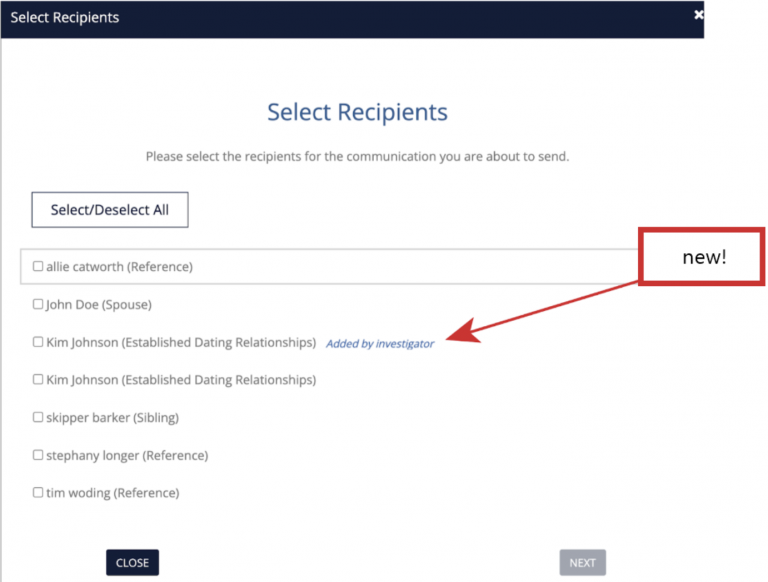
Users can now effortlessly identify contacts manually added to an investigation by the investigator when selecting relatives or references to email. A new “Added by Investigator” label appears next to these contacts during the selection process, reducing confusion and ensuring clear, accurate communication.

Investigator-added contact label in recipient selection

Finalized Investigator Tabs: Reopening

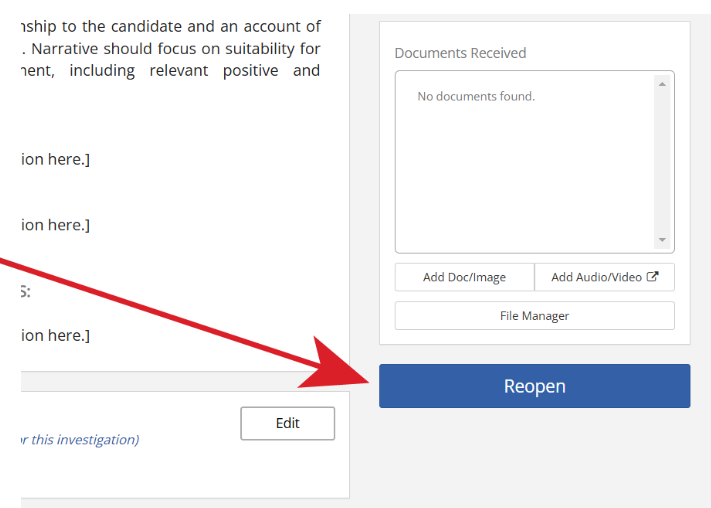
The new “Reopen” button provides investigators the ability to revert a finalized tab to its unfinalized state. Previously, once a tab was finalized, it could not be reverted. With this enhancement, investigators can click “Reopen” to restore a tab’s unfinalized appearance (white background), allowing for further adjustments while maintaining clear progress tracking.

Finalized investigator tab reopen button

Finalized tabs are visually marked with a blue background and a green left border, and they contribute to the overall completion percentage displayed in the Investigation Center and Investigation Journal.

Document Library: Instruction & Tooltip Improvements

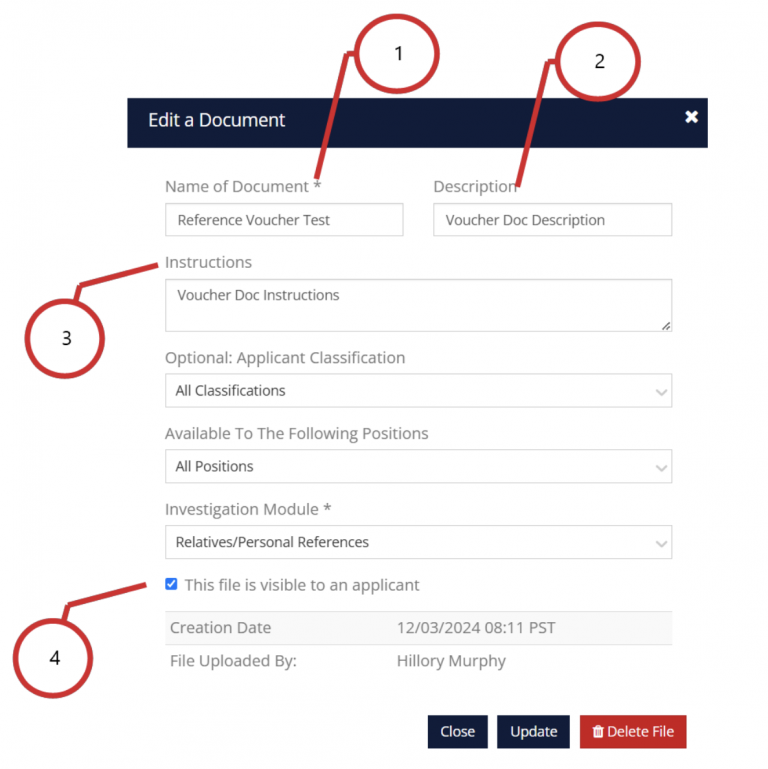
When configuring the settings of a document in the Document Library (Accessible via the primary navigation: Configuration > Documents, then clicking the “settings/gear” icon), Supervisors now have clearer guidance when configuring documents, thanks to newly implemented tooltips that define each field’s purpose and visibility.

Document settings window that is being improved with this release:

Document settings tooltip improvements

Improvements:

  1. New tooltip text: This is the title that will appear to the applicant in their portal.
  2. Updated Label: Description (for Applicant)
    New tooltip text: Visible to the applicant. Provide a brief explanation of the document’s purpose
  3. Updated Label: Internal Instructions
    New tooltip text: For internal use only. Add specific instructions or notes for agency staff. This will not be visible to applicants.
  4. New tooltip text: Check this box to make the document and its description visible to the applicant in their portal. Leave unchecked if this should be visible to internal agency staff only.

These tooltips ensure that critical information, such as document titles, descriptions, and internal instructions, is correctly displayed to applicants or kept private for internal use.

Personnel Management: Password Reset Confirmation Added

Supervisors will now see a confirmation dialog before triggering a user password reset for an agency user, preventing accidental reset notifications and ensuring intentional actions for better control and user management.
Neighborhood Checks – Mandatory City Field Validation

The “City” field is now correctly enforced as a mandatory field when adding an unlisted address in Neighborhood Checks, preventing errors and ensuring complete and accurate address entries.

January 10, 2025

Enhanced Cache-Control Security

Updated settings ensure sensitive data is never cached, improving data protection across all systems

Positions and Permits

Fixed a labeling issue on Step 4, in “Positions & Permits” to accurately display “Display forms from,” improving clarity in form selection.

Configuration: Agency Settings

Fixed an issue to prevent the same classification name being used more than once.

Investigator Withdraw Notes

Fixed an issue where the “Withdraw Comments” text area would clear after navigating back to the Withdrawal page, ensuring user input is retained.

Personnel Manager

Added a notification in Personnel Manager to alert users when changing a supervisor or investigator role to a non-investigation role, the user will be notified that this action will un-assign any existing investigations that are currently assigned to that user.

Legal / Fingerprints / Firearms Investigation Tab

Implemented date validation to prevent future dates and ensure “Results received” dates are not earlier than “Sent” dates, improving data accuracy.

Questionnaire Name Updates

Resolved an issue in “Questionnaire Manager” that incorrectly displayed an error when updating questionnaire names.

Update to Audio/Video Uploads

Improved error handling on the “Media Files Upload” page to display “Unsupported Media File” for invalid uploads, ensuring clarity and preventing upload errors.

Extended Permission Settings - Investigation Center

Extended permissions for the Investigation Center have been introduced for Supervisor and Investigator users (accessible in the Personnel Manager).

This provides the ability to grant or deny specific users the ability to view/manage investigations in the Investigation Center. Supervisors have access by default, while other roles can be configured as needed.

December 2024

December 12, 2024

Background Narrative Summary: Edit Feature

Investigators now have the ability to directly edit narrative summaries during the investigation finalization process. An “Edit” link has been added next to each narrative entry, allowing for seamless adjustments.

Previously, the narrative summaries were displayed but not editable within this screen. With this enhancement, investigators can now review and modify each summary directly, without needing to exit the finalization process and navigate to individual tabs.

Additionally, the summaries are now displayed in the same order as they appear in the ID Report, Investigation Details, and PDF Export, ensuring consistency across all views.

Agency Checks: Link Styling

Standardized link formatting across the platform to ensure clickable links are visually distinct (e.g., blue for links, grey for non-clickable text). This applies a consistent color scheme to improve interface usability.

PHQ Version Update (CA POST Versions Only)

The instructions for Question 3 in Section 8 have been updated for the CA POST PHQ versions 2-251 and 2-255. These updates align the instructions with the exact verbiage used in the official CA POST PHQ documents, ensuring consistency and compliance.

December 05, 2024

Applicant Email Attachment

Agency users can now attach documents to emails sent to applicants from within Guardian. Documents to be attached can be selected from any of the investigation files, the document library, or their own computer.

The enhanced “Send Email” feature enables investigators to include attachments, such as disqualification notices, standardized forms, or general information, which are automatically logged in the Investigation Journal for easy tracking.

Update Weak Passwords List

The platform’s weak password prevention list has been updated with more recent and comprehensive entries from leaked password databases. This improvement strengthens security by blacklisting newly identified weak or compromised passwords, ensuring users cannot choose easily guessable credentials.

By reducing vulnerabilities associated with commonly used or breached passwords, the update enhances account security and aligns the platform with password protection best practices.

Investigation Sections Order Update

The order of investigation sections in the “Quick Jump” dropdown menu has been reorganized to match the tab order in other areas of the software.

Applicant Portal: Account Email Update

Introduces a confirmation dialog that allows users to seamlessly switch their recovery email to their primary email without requiring manual deletion of the existing email.

This simplifies account management for applicants by eliminating extra steps, making email updates faster, more intuitive, and user-friendly.

Withdraw Requested Filter

A “Withdraw Requested” filter has been added to the Triage and Investigation Centers, accessible through the “Status” dropdown. This filter allows users to view only applicants who have submitted withdrawal requests, streamlining applicant tracking and enabling agency users to quickly identify and manage these cases, improving overall efficiency and clarity.

November 2024

November 28, 2024

PHQ Printouts: Drafts Clearly Marked

We’re introducing a new enhancement to the Personal History Questionnaire (PHQ) to prevent possible confusion when printed versions (hardcopy or PDF) are shared by the applicant.

While it is recommended that agency users review the certified PHQ submitted via the Guardian Platform, investigators will now have clear visual cues to identify if a printed or PDF PHQ is a draft when shared by the applicant outside of Guardian.

  • Watermarked Draft. Investigators can immediately identify whether a printed PHQ is a draft or certified version. Draft PHQs are now prominently labeled with a “DRAFT/NON-CERTIFIED” watermark on all printed pages, ensuring no confusion between draft and certified versions.
  • Detailed Version Information. Added details on the printout, such as the agency and position applied for, ensure investigators can quickly confirm the specific investigation the PHQ relates to, even if an applicant has multiple investigations through Guardian.

In addition, applicants attempting to print a draft version of their PHQ will see a clear warning indicating that it is a draft and may differ from the certified version available to the agency. This ensures they are aware of its draft status before printing it.

Applicant History Modal Enhancement

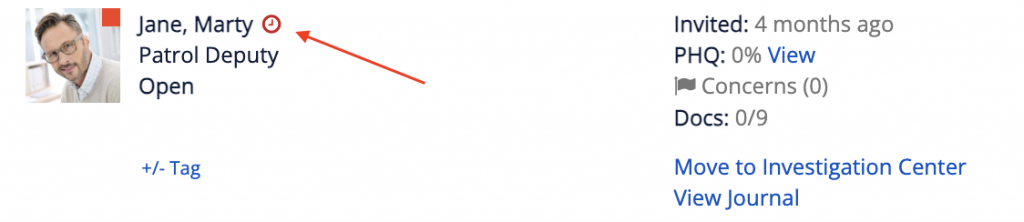
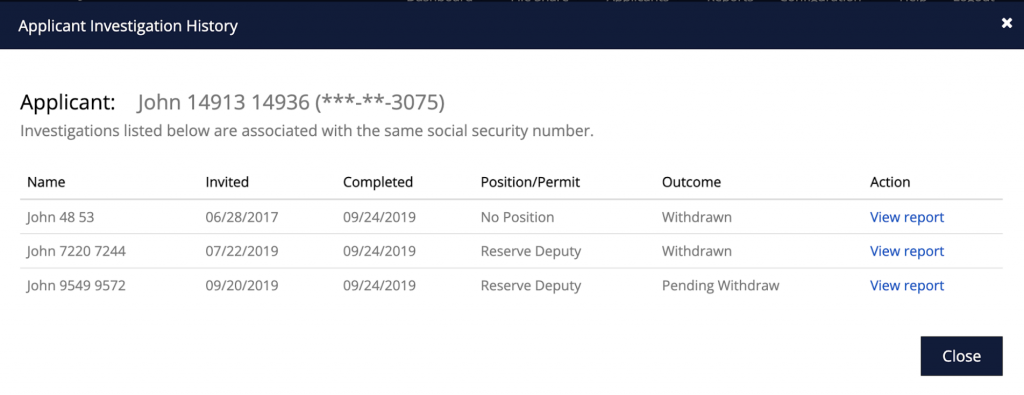
When an applicant has a prior investigation with your agency, a small clock icon will appear next to their name.

Applicant history clock icon

Clicking this icon launches the updated Applicant History Modal, which now includes the job position or permit they applied for in previous investigations, alongside key details such as the invitation date, completion date, investigation outcome (e.g., Disqualified, No Response), and a “View Report” link to view the prior investigation report.

Applicant investigation history modal

These enhancements provide quick, actionable insights into an applicant’s history, helping agencies efficiently assess repeat investigations and make more informed decisions.

Investigation Report PDF Export Enhancement

Generating a PDF investigation report can sometimes fail if one or more documents are problematic, such as corrupted or incompatible files. Previously, these issues caused the generation of the report to fail without clear feedback, requiring support assistance from Guardian.

We’ve added a new notification when the system identifies problematic files and explains the issue(s).

Options to Proceed.  If the error is encountered, investigators may now choose from the following options:

  • Exclude and Continue: Generate the report without the problematic files, with an option to download them separately.
  • Cancel and Resolve: Cancel the process to fix the files before regenerating the report.

This update eliminates the frustration of failed report generation by giving investigators clear options and actionable guidance. It streamlines the process, allowing reports to be completed faster and with greater control over the outcome.

November 07, 2024

Comprehensive Visibility in Department Directory

Previously, investigators using the department directory did not see themselves listed, leading to potential confusion and gaps in department visibility. This enhancement ensures that all active personnel, including the viewing user, are displayed. By providing a complete view of department members, this update promotes transparency, fosters better collaboration, and eliminates inconsistencies within the directory interface, creating a more cohesive user experience.

October 2024

October 31, 2024

“Resend Invite” Button Update

The “Resend Invite” button was mistakenly appearing in some archived investigations. This has been corrected, and the button now functions as follows:

  • The Resend Invite button will appear only in investigations where the applicant has not yet accepted the invitation.
  • It will display only in open investigations and will not appear in archived investigations.

October 17, 2024

PHQ: Auto-Complete Address

This feature streamlines the address entry process for applicants by providing real-time address suggestions as they type.

Example:

Image

As the user begins to type the address, the suggested pre-filled addresses become available for selection. The suggestions begin with the address that is closest to the user’s current location.

This helps reduce address entry errors and improves accuracy by auto-filling address fields and validating U.S. addresses.

Investigation Finalization Option Enhancements for PI Agencies

This update introduces additional finalization options for Private Investigation (PI) agencies, allowing them to more accurately reflect the outcome of investigations conducted for clients.

When closing/archiving an investigation, PI agencies now have the following options to select from the following archive statuses:

Complete: Investigation has been completed and is no longer considered active. Outcome of hiring decision unknown.

Hire: Applicant has been hired.

Non-Select: Applicant was not hired, but not due to disqualifying reasons.

Disqualified: Applicant was not hired due to disqualifying reasons.

Withdraw: Applicant has removed their application.

No Response (Triage Only): There has been no response from the applicant.

This enhancement streamlines the process of finalizing investigations, ensuring that outcomes are clearly documented when possible.

Default Document Inclusion per Position

This update enables agencies to select which of the default documents should appear to the applicant for the job position to which they have applied. This flexibility ensures that applicants are only asked to provide necessary documents that are relevant to the position they are applying for.

Documents that be shown/hidden from the applicant:

  • Birth Certificate
  • Driver’s License / ID
  • Social Security Card
  • Marriage Certificate
  • Dissolution of Marriage
  • Military (ID, DD-214, NGB-22)
  • Education (Diplomas, transcripts)

Visible by Default
All documents listed above are visible by default when a position is created. A new “step” in the position setup process has been added that will now allow you to uncheck any documents that you do not wish to display to the applicant.

Updating Existing Positions
If you already have a position and you would like to stop showing one or more of the documents above, simply visit (Configuration > Position/Permit Manager). Locate the desired position and click “Edit”. From here you can progress to the appropriate step and uncheck the documents you do not wish to show. Don’t forget to save once you have done so! Changes go into effect immediately.

Investigation Tab Display: Software vs PDF

This update addresses the issue of the mismatched investigation tab order as it is viewed in the Guardian Platform vs how it appears on the PDF export.

What has changed?
The order of the investigation tabs in the exported PDF will now match the way they appear in both the ID Report and in the Investigation Details screen.

ATTENTION: CA POST Agencies
The tab order in the software will display in a different order per CA POST requirements. Agencies in CA that adhere to the CA POST regulations require the tabs display in a specific order. While the PDF export already matches the POST requirements, this update alters the order the tabs appear in both the ID Report and Investigation Details areas.

Note that this change does not add or omit any information that is viewed in the software or the exported PDF. It only changes the order in which the information appears when viewed.

CA POSt PHQ Up tab order

Important Update for CA POST Agencies: Investigation Tab Order Change

Going Live: 10/17/2024

What’s Changing?
  • The order of the investigation tabs in the ID Report and Investigation Details screen will now follow CA POST’s required sequence.
  • Previously, the tabs inside the Guardian Platform did not match the CA POST order, though the PDF export has always aligned with those requirements.
  • Starting with this update, the tab order in the software itself will change to match the CA POST requirements.
What You Need to Know
  • The way you view investigation details inside Guardian will be different as the tab order adjusts to meet CA POST guidelines.
  • This update does not add, remove, or alter any content—only the sequence of tabs is affected.

We recommend reviewing the new order in the ID Report and Investigation Details screens to familiarize yourself with the updated structure.

October 10, 2024

Applicant Access: Completed Investigations

This release allows applicants to maintain view-only access to the information they submitted during their investigation, even after it has been completed.

Once an agency archives an investigation, applicants can no longer submit additional information, but they can still view their previously submitted forms, questionnaires, and documents for their records.

This update provides transparency and helps applicants retain important details related to their investigation. As a reminder, applicants ONLY see information THEY SUBMITTED. Applicants do not see any other information added to the investigation by agency staff.

October 03, 2024

Applicant Tag Display Enhancement

This fixes a display issue for applicant tags with long titles, ensuring the display properly without truncation, improving readability and usability when managing tags on the Open Investigation page.

PHQ Updates

Address Fields: Updated Labels with Examples
Updated field labels and tooltips provide clearer guidance for applicants entering their street address, minimizing confusion and ensuring proper data entry across the platform.

Address Fields:  Auto-Suggestion Implementation
Implementing an address auto-complete feature to help applicants correctly input their addresses, reducing errors in address formatting and improving accuracy, particularly for credit report requests.

PHQ Reference Edit: Confirmation Dialogue
A new confirmation dialogue alerts applicants when they attempt to make significant changes to reference details, helping to prevent unintentional data overwrites and ensuring the accuracy of reference information during investigations.

Narrative Summary Enhancement

  1. Narrative ‘Last Edited By:’ Addition
    Investigators can now easily track who made edits to narrative summaries, with the editor’s name and the date of modification displayed directly below the narrative entry, improving accountability and clarity during investigations.
  2. Narrative Summary Export/Share Option
    A new export/share toggle allows agencies to include the investigator’s name and the date/time of edits in the narrative summary, ensuring clear documentation when sharing or exporting files.
  3. ID Report Tab View
    Investigator name and modification date are automatically displayed in the ID Report for each narrative entry, providing transparency without the need for manual toggles.
  4. Investigation Tabs Update
    Investigators can view the signature line (investigator name and date/time) directly above narrative entries in investigation detail tabs, enhancing visibility of modification history.
  5. Investigation Journal Enhancements
    The journal now logs narrative modifications when an investigator edits and closes the narrative, improving accuracy in tracking changes.

Activity Log Report

A new “Activity Log” report enables agencies to track and monitor user activities across the system, with filters for date range, personnel selection (active or deactivated), and export options, improving oversight and investigation of user actions.

September 2024

September 26, 2024

Add Investigation Center: Sort by Date Added

Now, you can easily sort investigations by the date an applicant was added to the Investigation Center. This feature helps agencies better prioritize cases based on their internal workflows, ensuring that the most recent applicants are managed effectively, without confusion between different key dates like the invite or application submission dates.

Support Phone Number Update

The support phone number has been updated to (209) 288-0580 across the help section, email notifications, etc. This ensures you can easily reach support whenever needed.

September 12, 2024

Investigation Journal Entries: Dimensions & Tags

The investigation journal now contains logs for the addition, removal, and modification of dimensions and tags. This improvement ensures better collaboration and transparency by providing a real-time record of these key changes for anyone reviewing the file.

Credit Report Source Display

The credit report source now accurately displays the correct reporting agency when viewed in the ID Report and/or exported PDF.

August 2024

August 26, 2024

PHQ: New Section Finalization

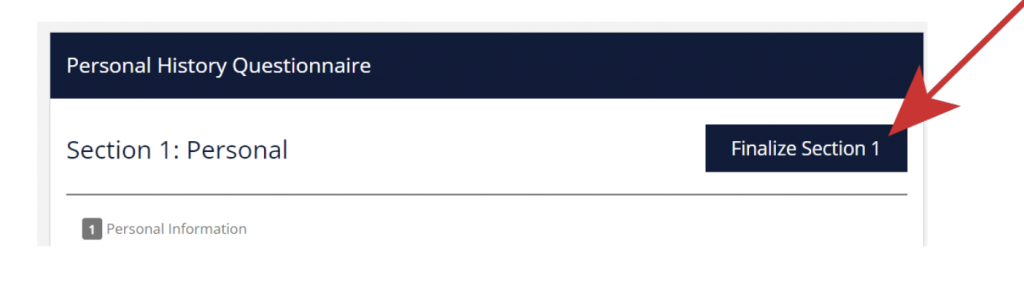
We’re excited to introduce the new “Finalize Section” feature in the applicant portal, making it easier than ever for applicants to complete their Personal History Questionnaire (PHQ). This feature allows applicants to confirm they’ve finished entering information in each section by clicking the “Finalize Section” button, which is conveniently located at the top and bottom of every section.

With intuitive visual cues and streamlined navigation, this enhancement ensures that completing and certifying the PHQ is faster, easier, and frustration-free. This is just the beginning of our commitment to making the application process as smooth as possible!

An applicant can “finalize” a section by clicking the new “Finalize Section” button that appears at the top and bottom of every section.

Finalize Section button in the PHQ

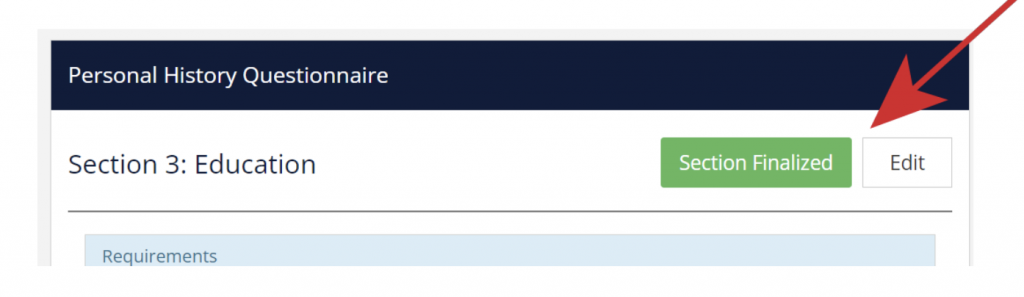
Once a section is finalized, the interface updates to display a “Section Finalized” message at both the top and bottom, providing clear confirmation that the section is complete.

Section Finalized confirmation in the PHQ

Editing a Finalized Section
Need to make changes to a finalized section? No problem. Applicants can click the “Edit” button, available at the top and bottom of the section, to reopen it for revisions. After making any necessary updates, they can finalize the section again.

Certification
It’s important to note that finalizing a section does not immediately send the answers to the agency. Applicants must first finalize all sections, and then proceed to “Certify” the entire PHQ. Only after this certification step will the PHQ data be sent to the agency for review.

Terminology: “Areas of Concern” is now "Dimensions"

The term “Areas of Concern” in the PDF export of the ID report has been replaced with “Dimensions” to maintain a neutral and unbiased tone, matching the way it is displayed in the internal ID Report.

August 15, 2024

Red Envelope Notification Update

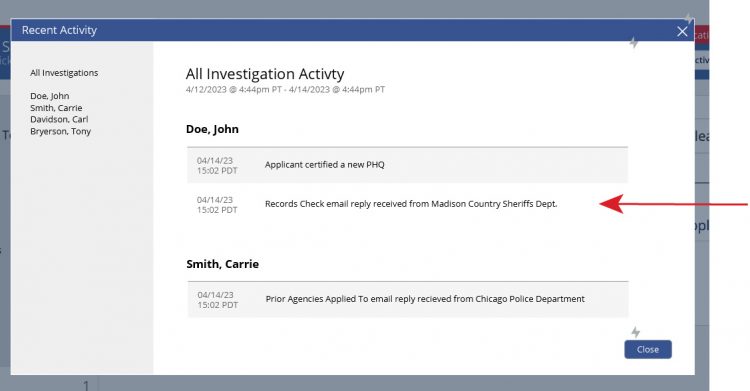
The red envelope notification that appears in the investigation details of an assigned investigation has been updated to appear only when a new activity message hasn’t been read in either the journal or the Recent Activity center. This helps reduce duplicate notifications, ensuring you only receive an alert once per event instance.

PHQ Unemployment Gap Calculation Update

We’ve improved the way unemployment gaps are calculated in the Personal History Questionnaire (PHQ). The system will now account for any unemployment periods between the end of an applicant’s last job and the PHQ certification date, ensuring accurate reflection of any current unemployment. This update helps prevent discrepancies in employment history for a smoother investigation process.
August 01, 2024

Late Document Addition to Archived Investigations

When investigation documents are returned after an investigation has been archived, Guardian now offers the capability to add these late files or documents to the archived investigation without needing to reopen it.

Seamless Integration: You can now seamlessly integrate late documents into archived investigations, ensuring that all relevant information is stored in one place.

Efficiency: Save time and avoid the hassle of reopening completed investigations.

Enhanced Record-Keeping: Maintain comprehensive and up-to-date records, even after the investigation is closed.

Journal Logging for Transparency
To ensure full transparency, any files or documents added to an investigation post-archival will be logged in the Investigation Journal. This maintains complete visibility of all actions taken, providing an audit trail for future reference.

Pending Withdraw: Applicant Reminders

Guardian has introduced an enhancement to the email reminder system to streamline communication with applicants in the withdrawal process.

Targeted Communication: If an applicant has submitted a withdrawal request or is in a withdrawal pending status, reminder emails will cease for the applicant. This ensures that only active applicants receive task reminders, reducing unnecessary notifications.

Efficiency Improvement: By stopping reminders for applicants who are no longer active, the system prevents confusion and enhances the overall efficiency of the background investigation process.

Continued Reference Follow-Up: Reminder emails will still be sent to references, ensuring that all necessary information is collected even if the applicant is in the withdrawal pending status. This maintains the integrity and completeness of the investigation.

Investigator File Reassignment

Guardian has introduced a new (optional) feature enabling investigators to reassign investigation files directly to their peers, enhancing flexibility and efficiency in collaborative work.

Increased Autonomy: Investigators can now reassign files without relying on supervisors, reducing delays and streamlining the handoff process.

Enhanced Collaboration: Facilitates smoother transitions between investigators, ensuring continuity and efficiency in ongoing investigations.

Agency Permissions: Supervisors can control the reassignment capability via agency settings, enabling or disabling the feature as per agency protocols.

Individual Permissions: Supervisors can toggle the reassignment capability on a per-user basis.

New “Re-assign Investigation” Button

When the feature is enabled, Investigators can now reassign investigation files using the new “Re-assign Investigation” button in the investigation details view. Upon selection, a dropdown list allows them to choose a peer.

The receiving investigator is notified of the reassignment, ensuring they are promptly informed of their new responsibilities.

Position Manager - Classification Filter

Guardian introduces a new classification-based filtering system within the Position/Permit Manager to enhance document and form selection efficiency.

Targeted Document Selection: Users can now filter documents and forms by classification, ensuring only relevant documents are displayed, reducing errors and inefficiencies.

Classification Filter Dropdown: A new dropdown menu labeled “Classification” is added to the document and form selection interface, allowing users to filter and view documents by classification.

Consistent Display: Documents marked to appear under all classifications will still display, ensuring all pertinent documents remain accessible.

This feature significantly improves the document selection process, making it more efficient and user-friendly, especially for private investigation firms managing multiple customer accounts.

July 2024

July 18, 2024

PHQ: Employment History Gaps

We have fixed an issue where gaps in applicants’ employment history were not being accurately displayed. Specifically, the period of unemployment between the last job experience and the current date of PHQ submission was not being calculated.

This correction ensures that the automatically calculated periods of unemployment now accurately reflect the time between the applicant’s last known job and the date of PHQ certification.

.

PHQ Updates: CA POST Compliance

CA POST AGENCIES ONLY: To ensure compliance with the recent CA POST PHQ compliance standards changes for California agencies, we’ve updated several questions in the PHQ. These updates include verbiage adjustments, new input fields, and alternate questions tailored specifically for CA POST agencies to maintain adherence to state regulations.

If you are a CA POST agency and have not yet switched to the new CA POST PHQ in Guardian, please send us an email to let us know you would like to switch:  [email protected]

This correction ensures that the automatically calculated periods of unemployment now accurately reflect the time between the applicant’s last known job and the date of PHQ certification.

Narrative Templates: Bullet Lists

We’ve added the ability to create bulleted lists within the narrative templates. This new feature allows for clearer and more organized presentation of information.

Easy Multi-Agency Navigation

Previously, Guardian users managing multiple agencies had to log out of one agency and then log back in to another to switch between accounts. Now, switching between multiple agency accounts is much simpler with a new dropdown menu in the header.

This feature allows you to easily select and move to a different agency’s dashboard without logging out. Please note that only users who manage multiple agencies with the same login email will see this navigation option.

New Merge Tag: Last 4 Digits of SSN

In addition to our existing merge tag for the applicant’s full social security number, we have added a new merge tag that displays only the last four digits of the Social Security Number (SSN) in templates (***-**-1234). This enhancement reduces the exposure of sensitive information while still providing necessary identification details wherever warranted.

In addition to our existing merge tag for the applicant’s full social security number, we have added a new merge tag that displays only the last four digits of the Social Security Number (SSN) in templates (***-**-1234). This enhancement reduces the exposure of sensitive information while still providing necessary identification details wherever warranted.

July 04, 2024

Applicant Password Change Notifications

File Manager: “Supervisor Only” Fix

We have updated the name for a category in the file manager that was incorrectly titled “Final Documents.” It is now correctly labeled as “Supervisor Only,” ensuring supervisors can easily identify and access their designated document storage. As before, if an uploaded file/document is saved/moved to the “Supervisor Only” category, only Supervisor users will be able to access the file/document.
This allows for the inclusion of sensitive information to be stored in the Investigation File, while minimizing its exposure.

Proof of Citizenship Tab Update

We have updated the subheader in the Citizenship Age Verification tab to reflect a more inclusive term. Since many agencies do not factor citizenship status into their hiring decision process, the subheader “Proof of Citizenship” is now labeled as “Documents,” accommodating various state laws and required document types.

Text Editor Enhancement Discovery

We have enhanced the text editor used for writing narrative summaries, templates, etc.  Upgrades include the ability to highlight text, change font colors, and adjust font styles. These new features provide users with greater control over text formatting, improving the overall document creation experience.

Reference Email Communications

We’ve improved our reference email system to enhance clarity and efficiency in managing reference checks. Now, references will receive reminder emails when they have an incomplete form sent by an investigator.

Handling Multiple References

In cases where a reference serves in multiple capacities (e.g., Sibling and Co-worker), Guardian allows agencies to create specific reference forms for each relationship. Previously, references might have been unaware of the need to complete multiple forms, leading to confusion and incomplete submissions.

To address this, references will now receive a single email displaying all required forms along with their current completion status.

This update ensures that references only receive group reminder emails for incomplete forms, reducing the number of individual follow-up emails.

Additionally, reminder emails will no longer be sent for archived investigations.

June 2024

June 26, 2024

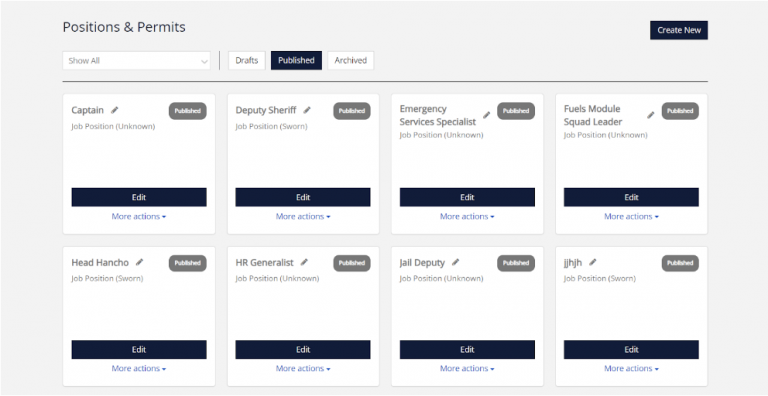
Position/Permit Manager

Position and Permit Manager screen

This update revolutionizes how you manage job position and license investigations. With the new Position/Permit Builder, you can effortlessly create investigation templates, integrate questionnaires, documents, and files into a unified template, making the process more efficient and user-friendly.

The new Position / Permit Manager features:

  • A more intuitive way to create/manage job position or license/permit investigation templates.
  • Simplifies the association of documents and forms with specific positions/permits.

Allows you to associate a customized PHQ/Questionnaire with each position/permit (Currently only activated for select agencies during pre-release beta).

Applicant Portal

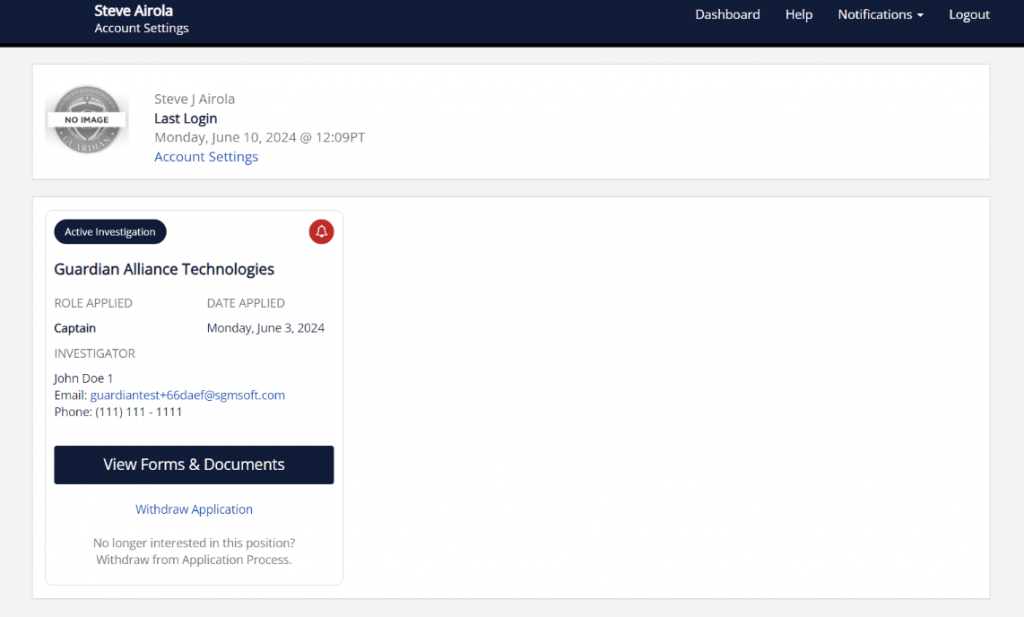
Applicant Portal dashboard screen

Our newly enhanced Applicant Portal offers a streamlined application process for your applicants. The updated dashboard improves navigation, and the new questionnaire system simplifies how applicants complete and certify their personal history, making the experience more efficient and user-friendly.

  • Easy Access to Investigations: Applicants can easily access all their investigations in one place.
  • Enhanced Notification System: Important messages, such as new questions or documents added, are highlighted for the applicant’s attention.
  • Advanced Certification Logic: This logic determines certification of PHQs across multiple simultaneous investigations, notifying investigators when answers to shared questions across different questionnaires are modified.

With these updates, applicants can easily track the progress of their investigations, access important documents, and receive timely notifications about any required actions. This allows applicants to quickly access and complete forms, upload necessary documents, and stay informed about their application status—all in one place.

May 2024

May 16, 2024

California POST Compliance Update: PDF Export

Guardian has adjusted the format of the exported PDF version of the ID Report to comply with California POST specifications. This change only affects the exported PDF and does not alter the internal ID report view. The narrative summary portion of the PDF will now follow this specific order:

  1. Dimensions
  2. Advisements, Releases, and Waivers
  3. Personal History Questionnaire
  4. Citizenship / Age Verification
  5. Legal / Fingerprints / Firearms
  6. Polygraph / CVSA / EyeDetect
  7. Med / Psych Clearances
  8. Agency Checks
  9. NDI
  10. Driving Record
  11. Education Verification
  12. Employment History
  13. Relatives/Personal References
  14. Dissolution of Marriage
  15. Neighborhood Checks
  16. Military History
  17. Financial Check
  18. Social Media
  19. Misc. Documents / Questionnaires

May 2, 2024

Investigation Journal: File Activity Enhancement

Enhancements:

The Investigation Journal now offers expanded tracking capabilities for file-related activities performed by agency users. Previously, only file additions by applicants were recorded. With this update, any additions, movements, or modifications of files made by agency personnel will also be logged.

Key features of this update include:

  • Comprehensive Logging: All file activity, such as adding, moving, or altering file properties, is now logged. Details such as the username, date, file title, and the specific investigation tab involved are captured.
  • New “Files” Category: A dedicated category for file activities has been introduced in the journal. This allows users to specifically view all file-related actions.

This enhancement to the Investigation Journal ensures that the integrity and completeness of investigative records are maintained, providing a robust framework for accountability and transparency in file handling.

April 2024

Apr 25, 2024

Enhanced Email Logging for Applicants

The Guardian Platform has been updated to enhance the tracking of emails sent to the applicant during the investigation process.  Additional tracking activity added to the journal:

  • Direct emails (sent from within Guardian)
  • Follow-up reminders (i.e. PHQ completions, Invitation Acceptance)
  • Updates on application status (i.e. New documents available)

Applicant Rejection Notice

The language used in rejection notices has been revised to be more neutral, and agencies now have the option to customize the subject lines of these emails to better align with their communication standards.

Apr 18, 2024

Applicant Withdrawal Notification Enhancement

We’ve enhanced the notification system for when an applicant withdraws from the background investigation process. Now, all supervisors will receive an alert if the applicant isn’t yet assigned to an investigator, ensuring no withdrawal request goes unnoticed.  Additionally, the visual status of an applicant’s entry will change to yellow to indicate a withdrawal request, helping supervisors quickly identify changes in applicant status.

(This is the little colored square that appears on the applicant’s profile picture).  As a reminder, any Supervisor users who do not wish to receive withdrawal notifications may opt out by updating their individual account settings in Guardian.

Applicant Invites: New Workcenter Setting

We’ve introduced a new feature in the Agency Settings that allows agencies to customize how applicants are added to the Guardian Workcenters. When inviting an applicant to an investigation, agencies must currently choose to add the applicant to the Triage Center or the Investigation Centers for each applicant added.

With this new feature, agencies can now choose to automatically add applicants to the Triage Center. When activated, the Triage/Investigation Center option will no longer display when inviting an applicant and they will automatically be added to the Triage Center.

March 2024

Mar 07, 2024

Association Improvements for Deactivated Users

In our latest update to the Guardian platform, we’ve introduced key enhancements to streamline the management of deactivated users, focusing on Investigation History Preservation and Approval Ladder Decisions.

  • Investigation History: If an investigator user is deactivated, the platform keeps the association between investigations and their initial investigators, covering both archived and active cases. The system also now provides a notification for reassigning active investigations when an investigator account is deactivated.
  • Approval Ladder: The platform keeps links to inactive users, keeping their approval actions visible for full transparency. This ensures ongoing access to past decisions, upholding our dedication to clear and accountable operations.

PHQ Update: Section 6 - The Selective Service

The Guardian Platform has been updated to enhance the vetting process in Section 6: Military Experience. Now, if an applicant indicates they are required to register for the Selective Service but have not registered, this discrepancy will automatically flag as a concern in the applicant’s report, improving oversight and compliance.

PHQ Update: Section 8 - Cannabis Revision

As we continuously refine Guardian to meet the diverse legal requirements of all regions, the Personal History Questionnaire (PHQ) within Section 8’s legal drug use questions have been updated as of Feb 27, 2024.

What’s Changed?
Cannabis and related substances have returned to the list of examples in Section 8 concerning illegal drug use. The inclusion of cannabis is meant to address the full scope of illegal drug use questions for regions where requesting use of cannabis for job seekers remains legal.

California Agencies:
The questions have been tailored to comply with California law. Applicants applying for job positions in California will be reminded within the questionnaire not to include the off-job and away-from-workplace use of cannabis in their responses, per state law requirements.

Looking Ahead (California POST agencies):
Guardian is prepared to meet the upcoming California POST standards by the July 1st deadline. Our platform will support the exact wording required for California agencies that follow POST requirements, ensuring seamless compliance. The question will remain unchanged for all other agencies.

This update reflects our ongoing effort to offer a versatile platform that accommodates the nuanced needs of law enforcement agencies across the country.

Investigation Edit Added Contact

Guardian Platform now enables investigators to update contact information within an investigation profile at any time after the initial entry. This enhancement allows for the editing of contact details (like references, roommates, guardians, etc.), ensuring that contact information remains accurate and up-to-date as investigations progress.

February 2024

Feb 22, 2024

Agency Headquarters / Divisions

The Agency Headquarters / Divisions feature introduces a structural innovation tailored for larger agencies, enabling them to organize and manage their operations with unprecedented clarity and control. This feature allows the creation of divisions under a primary agency, offering independent access and data management while maintaining overarching visibility at the headquarters level.

It streamlines operations across multiple units, enhances security by segregating access, and provides a unified billing and management framework. This strategic organizational tool empowers agencies with the flexibility to adapt their management systems to the unique demands of their operational structure.

Applicant Onboarding and Account Recovery

Improvements to streamline the process of setting up a Guardian Account for applicants and simplifying account recovery. These enhancements are designed to expedite the submission of information to agencies, ensuring a quicker response time for applicants.

Reference Questionnaire Reminder: Link Integration

When a reference receives a reminder email to fill out an online form, the reminder email will now include a direct link and unique access code, streamlining the completion process and enhancing efficiency in the investigation workflow.

Social Media Screen - ID Image

Requests for social media screens will now utilize the applicant ID to help analysts identify the applicant’s social media profiles/activity more accurately and efficiently. If the applicant identification is not present at the time of the request, the investigator is provided with clear guidance.

Credit Report Authorization Enhancement

This enhancement ensures that background investigators can only request a credit report once the applicant has uploaded the required authorization form. This reinforces compliance and security in the investigation process.

PHQ Update: Cannabis References Removed from Illegal Drug Use Section

In alignment with updated regulations for CA agencies, Guardian has removed references to cannabis, including Hashish / Hashish Oil and Tetrahydrocannabinol (THC), from the examples listed in Section 8, Question 4 on illegal drug use in the PHQ. This update ensures compliance with hiring practices while maintaining the integrity of the questionnaire.

January 2024

Jan 18, 2024

Enhanced Accessibility to Dimensions in Investigations

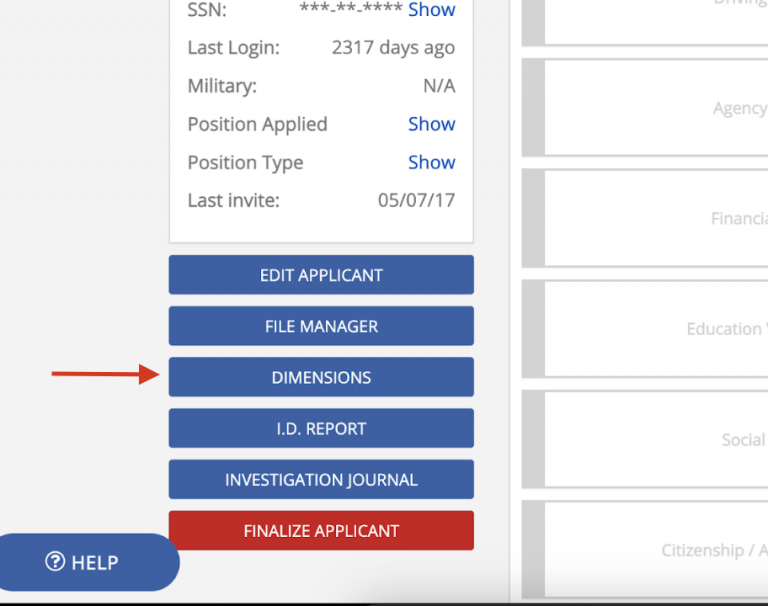
 Guardian’s latest update introduces a more streamlined way to add Dimensions to investigations. Now, you can access and add Dimensions directly from the investigation details, thanks to a new button placed below “File Manager”.

Dimensions button in investigation details

This enhancement allows for the addition of Dimensions without finalizing the applicant, offering greater flexibility. Additionally, the Dimensions page has been refined with clearer text, now highlighting “Areas of Concern” and “Issues/Concerns”, ensuring a more intuitive user experience. These changes are designed to enhance the investigation process while keeping the core functionality of the Dimensions feature unchanged.

Investigation Report - Dimension Inclusion

We’ve enhanced the investigation report functionality to provide more comprehensive insights. Users can now opt to include a detailed list of dimensions for each applicant in their reports, using a new “include dimensions” checkbox. This inclusion adds a dedicated column in the report that displays all disqualifying dimensions associated with each applicant. This allows agencies to import and/or analyze data in third-party software.

PHQ Certification Date Visibility

The Guardian platform now includes an improved notification system for the Personal History Questionnaire (PHQ) certification. This enhancement prominently displays the certification date and time on both the full PHQ view and the investigation details view, ensuring investigators are immediately aware of the certification date. If the last certification is greater than 90 days, the elapsed time will be highlighted in red for better visibility.

Jan 10, 2024

Enhanced Customization of User Permissions

Guardian has introduced flexible user permissions customization, allowing agencies to tailor access and security more effectively to meet their specific needs and enhance user satisfaction.

Configurable Permissions now include:

  • Invite Applicants: Create a new investigation and invite an applicant to join.
  • Triage Center: View and manage investigations in the Triage Center.
  • Personnel Manager: Add or remove agency users. (i.e. Supervisors, Investigators)

Improvement in Automated Rejection Email Accessibility

We have enhanced the visibility of rejection emails sent to applicants, with easy access to these emails now included in both the ID report and the investigation journal for reference by agency users.

December 2023

Dec 20, 2023

Multiple Account Access Enhancement

The upcoming update to Guardian introduces a significant enhancement tailored to Private Investigators and other users serving multiple agencies. This enhancement allows for seamless access to multiple agency accounts using a single email address. Previously, users like Private Investigators had to manage separate logins for each agency, complicating their workflow. The new feature simplifies this process, enabling users to switch between accounts effortlessly.

Details:

  • Single Login for Multiple Accounts: Users can now log into multiple accounts linked to one email. A dropdown menu will appear upon login for account selection.
  • Switch Agency Option: A new UI option enables quick switching between authorized agencies.
  • Enhanced Security Measures: To address potential security risks, the update includes:
    • Restriction on email address changes for profiles linked to multiple agencies.
    • Mandatory Guardian support intervention for email modifications.
    • Additional rules for email changes, password updates, and account reactivation.
  • Handling Multi-Agency Accounts: Specific protocols are in place for deactivating and reactivating multi-agency accounts to maintain security and data integrity.

For Private Investigators: This update is especially beneficial for Private Investigators managing multiple accounts. The streamlined login process and enhanced security measures will significantly improve their efficiency and data safety.

Final Report: Reordering for Background Investigation Dimensions

Guardian’s latest update specifically addresses the new California POST (Commission on Peace Officer Standards and Training) requirements, ensuring that all agencies, including those in California, benefit from improved reporting standards. The key feature of this update is the enhanced presentation of “Background Investigation Dimensions” in the ID Reports, which aligns with the recent regulations set forth by California POST.

Key Changes:

  • Compliance with CA POST: The update brings Guardian in full compliance with the new California POST regulations.
  • Renamed and Repositioned Section: The “Disqualification” section is now renamed “Background Investigation Dimensions” and is prominently featured at the beginning of each final report.
  • Universal Application: While addressing California’s requirements, this change is implemented for all agencies using Guardian.

Significance for CA Agencies:
This update reassures California agencies of Guardian’s commitment to compliance with state-specific regulations. It ensures that all final reports meet the standards required by California POST, maintaining Guardian’s reliability and trustworthiness as a vital tool for agency operations.

Text Notifications for Applicants

Applicants may now choose to receive text notifications alongside existing email notifications. This update empowers applicants to stay better informed during the investigation process, resulting in quicker responses and timely updates.

How It Works:

  • New Applicants: During the account creation process, new applicants can now select their preferred notification methods. This includes the option to receive text notifications alongside email alerts.
  • Existing Applicants: Existing applicants can easily update their notification preferences in their Guardian account. By accessing the “Account Settings,” they can opt to start receiving text notifications.
  • Notification Delivery: Notification delivery is tailored to each applicant’s preferences. If text notifications are selected, applicants will receive both email and text message alerts.
  • Standard Rates and Easy Opt-Out: Standard text messaging rates apply. Applicants can change their preferences or opt out of text notifications at any time through their account settings, or through direct reply to a text message.

PHQ Section 8 Update: Use of Cannabis

Guardian has revised the Personal History Questionnaire (PHQ) in Section 8, particularly addressing the compliance with cannabis use disclosures in employment applications. While this change is directly in response to a new California law effective January 1st, 2024, it also anticipates similar legal shifts in other states regarding cannabis use.

PHQ Section 8 Adjustments:

  • Removal of Specific Drug References: From Question 4 in the PHQ, “Marijuana (with or without a prescription)” and “Synthetic Marijuana known as K2” have been excluded from the list of examples.
  • Revised Question Wording:
    • Question 4.1: Now states, “Have you ever used any illegal substances as defined above?”
    • Question 4.2: Updated to, “Have you EVER engaged in selling, manufacturing, purchasing, furnishing, cultivating, carrying, or holding for ANY illegal substances you were not professionally prescribed?”

State-Specific and General Compliance: While addressing California’s specific legal requirements, the PHQ maintains its relevance in other states, particularly where cannabis legality varies.

November 2023

Nov 30, 2023

File Manager Bulk Upload: Default File Name

Each document’s default display name is automatically set to its file name (excluding the extension), minimizing manual input. Users can still customize these names as needed.

Reference Follow-Up Emails

Follow-up emails sent to references are now logged in the investigation journal, including the reference’s name and relationship to the applicant, for better clarity. Additionally, emails sent to applicants about unresponsive references will only mention those references added by the applicant, maintaining confidentiality of investigator-added contacts.

Manual Contact Addition and Form Completion Improvement

Investigators can now manually complete a questionnaire form for developed contacts added to the list of relatives and personal references by the investigator. This feature mimics the functionality available for existing contacts, ensuring seamless integration into the system.

Nov 21, 2023

Expanded Character Limit for PHQ Form Input Boxes

  • Character Limit Expansion: Expanded the character limit for the ‘explanation’ text box in question 9.2, ensuring complete user responses are saved and viewable.
  • System Wide Review of Text Boxes: Initiated a comprehensive system-wide review of all ‘explanation’ text boxes to identify and rectify similar character limit issues.

PHQ Liabilities and Debt Section Update

Simplified Debt Entry: We’ve removed the “$/month” default text from the ‘Total Amount Owed’ field. Now, users can input the total debt amount without confusion.

Enhancement of Social Media Report File Management

Self-Service File Deletion: Users can now remove files directly from the report interface, thanks to a new trash icon.

Nov 16, 2023

New Investigation File Manager

Image: Investigation File Manager

The Investigation File Manager is a significant enhancement in Guardian’s platform, designed to streamline file management in investigations. This update introduces a unified system for handling multiple files, offering both efficiency and convenience.

  • Bulk Upload Capability: Enables the uploading of multiple files at once, greatly improving efficiency.
  • Centralized File Management: Provides a single location for renaming or moving documents, simplifying the file handling process.
  • Accessible File Manager: Directly from the Investigation Details page or within Investigation Tabs, offering seamless integration into existing workflows.
  • Enhanced File Interaction: Features include viewing, editing, and deleting options for individual or multiple files, along with sorting and filtering capabilities.
  • Simplified File Addition and Editing: Intuitive interfaces for adding and editing single or multiple files.
  • Confirmation and Assistance: Clear confirmation messages for file actions and a dedicated File Manager Help View for additional guidance.

User Experience Benefits

  • Reduces administrative burden, allowing investigators to focus more on critical aspects of their work.
  • The intuitive interface aligns with user habits, facilitating easier adoption and usage.

Additional Information

  • Deletions of applicant-provided files are recorded in the Investigation Journal.

October 2023

Oct 26, 2023

Multi-Factor Authentication (Applicants)

Recognizing the importance of data security, we’re introducing Multi-Factor Authentication (MFA) for applicants, similar to our existing MFA for agency users. Customizable Settings: Applicants can choose their level of security by turning MFA on or off as per their preference. Applicants will receive a one-time code sent to their email, based on their chosen settings:

  • New Device Only: A code is sent when signing in from an unrecognized device.
  • New Device or New Location: A code is sent when using a new device or signing in from a different location.
  • Always: A code is sent every time the applicant signs in, regardless of device or location.

Investigation Time Elapsed Sorting

Keep track of time spent on investigations like never before.

Image: investigation-journal-investigation-time

Here’s what’s new:

Active vs Archive Time: Separate counters for the time an investigation has been active and the time it’s been archived.

No Reset on Reassignment: The duration counter continues even if the investigation is reassigned to another user.

Detailed Reporting: Reports now only account for “active” investigation time, ignoring any time spent in archive.

Interface Enhancements: New “View Journal” links and a dedicated “Duration” page in the Journal for a detailed timeline.

Comprehensive Metrics: Displays total cumulative time for Triage, Investigation, and Total Active time.

Oct 4, 2023

Anti-Accidental-Delete in Investigator Notes

Accidental note deletions are a thing of the past. We’ve fortified investigator notes with an anti-accidental-delete mechanism, similar to what you’re used to in narratives.

NGB-22 Document for Military Section

Applicants can now upload their NGB-22 documents directly within the Military Section. This streamlines the process and keeps all relevant military records in one convenient location.

Reference Notification Reminder

Automated reminders will now be sent to references to complete their questionnaires. These reminders kick in 2 days after the initial request and will repeat on days 5, 8, and 10 if not completed.

Reference Requests: Attached Files

Attached files sent to references are now securely stored and accessible only via the online form page, ensuring they remain within the secure Guardian ecosystem. (Attachments will no longer appear as an attachment to the email the reference receives.)

Multi-Select Classification Expansion

We’ve expanded our multi-select feature for classifications. Now you can simultaneously filter and view data across multiple classifications in agency reports, the Triage Center’s applicant list, and the Investigation Center.

September 2023

Sep 8, 2023

International Phone Number Feature

We’ve enhanced the PHQ input boxes to accommodate international phone numbers. Previously, only US standard numbers were accepted, which posed challenges for applicants with international references. Now, users can seamlessly input both domestic and international numbers.

Notify Applicant on New Doc/Form Availability

Applicants will now receive timely notifications whenever a new document or form becomes available during an active investigation. This ensures that they are promptly informed of any new documents they need to fill out or view. Notifications can be triggered by various events, such as the addition of a new document by a supervisor, changes in the applicant’s job position, or assignment of a new classification.

Our goal is to streamline the application process and enhance communication, making it easier for applicants to stay updated and take necessary actions.

Space Force Option Addition in Military Section

We’ve made an update to the Military section of the Personal History Questionnaire (PHQ). Applicants can now select the “Space Force” as their branch of service. This addition ensures that individuals affiliated with the Space Force can accurately represent their service branch in the PHQ. The enhancement is purely for selection purposes, with no branch-specific functionality changes.

August 2023

Aug 17, 2023

Improved Email Address Verification for Applicant References

Overview:

To ensure the integrity of our application process and to encourage applicants to provide accurate email addresses for their references, we have introduced an enhanced verification system. This update aims to deter applicants from casually skipping the email address input and ensures a more thorough and accurate background investigation process.

Details:

When an applicant selects the “unable to obtain email address” option for a reference, a detailed confirmation dialog will appear, emphasizing the importance of providing an email address. The dialog will guide the applicant through a two-step verification process, ensuring they have made genuine efforts to obtain the reference’s email address. If an applicant decides to uncheck the option, a new dialog will prompt them to confirm their action and provide the email address.

Note:

Applicants are reminded that any misinformation or misrepresentation detected may result in repercussions, including the potential rejection of their application.

Aug 3, 2023

Improved Navigation for Agency Edits in Agency Directory

We’ve noticed that some of you were having trouble when making changes to an agency from certain views. After saving or canceling your changes, the system wasn’t taking you back to the right place.

We’ve made sure that after you edit an agency, you’ll be taken back to where you started. So, if you’re making changes from the communication report view, you’ll go right back there after you’re done. The same goes for the inquiry details view. This should make your experience smoother and more intuitive.

Updated Verbiage for “Pending” Investigations

The verbiage seen by investigators when setting an investigation to pending status for review by a supervisor implies the investigator is recommending the applicant for hire or disqualification, which is not accurate.

The verbiage has been updated to align more with the finalization options’ language and effectively communicate the investigation’s status to supervisors without implying any recommendation.

Pending statuses are now displayed as:

COMPLETE
No disqualifying factors were discovered during the investigation.

DISQUALIFY
Disqualifying factors were discovered during the investigation.

WITHDRAW
Applicant has voluntarily removed their application. No further investigation is required.

Adding Landlord Contacts for Background Checks

We’ve identified a limitation in our system where background investigators couldn’t add new landlord contact information found during an investigation. Previously, only roommate contacts could be added.

We’ve now made it possible for investigators to add landlord contacts. This is done using a specific template, separate from the applicant’s main data. This new contact information will only be accessible to the investigating agency, ensuring the privacy of all parties involved.

Secure Autosave for Reference Questionnaires

We understand that the reference questionnaires you send out can sometimes be quite lengthy, and it may not always be possible for references to complete them in one sitting. In the past, if a reference closed the tab, all their answers would be lost and they’d have to start over.

We’ve introduced a new feature that saves the reference’s answers so if a reference needs to take a break, they can come back to the questionnaire on the same device and browser, and all their previous answers will still be there.

To ensure the answers are secure, we’ve added a passcode system. When a reference first accesses the questionnaire, they’ll be given a unique passcode. They’ll need to enter this passcode each time they want to access the questionnaire. If they enter the wrong passcode three times, they can request a new one be sent to them via email.

This new feature makes completing the reference questionnaires more flexible and secure, allowing references to complete them at their own pace without worrying about losing their progress.

Approval Ladder Results added to ID Report

We’ve added Approval Ladder details directly to the ID Report. Now, anyone who has access to the Investigation file can easily view these details. This should streamline your process and save you time when looking for prior approvals.

Automated Rejection Letter to Applicants

Previously, if an applicant was disqualified or marked as non-select, you had to manually send them a rejection email.

We’ve automated this process for agencies that would like to use this optional feature. If activated, when an applicant’s status is updated to disqualified or non-select, the system can automatically send them a rejection email.

You have full control over this feature. In your agency settings, you can choose whether to turn this auto-send feature on or off (it’s set to off by default). You can also edit the default email template to fit your agency’s needs.

For record-keeping, every email sent is logged into the Investigation Journal. This new feature should save you time and ensure consistent communication with all applicants.

July 2023

Jul 20, 2023

Supervisor Dashboard Redesign

We’re revamping the Supervisor Dashboard to bring more value and customizability to our users. This new design will prominently feature overview stats for each workcenter and will include more accessible buttons and content areas. This modular approach allows for easy addition of future features and enhancements.

Filtering Options: Users can toggle between Position and Classification views. Clicking on one of the positions (or classifications) in the “Active Investigations” section will filter the results in each of the work centers so you always know exactly how many investigations are happening for each, and where they are located.

Supervisor Dashboard redesign

Agency Checks: Inbound Email Responses

We’re improving Agency Checks. Agencies responding to Record Requests or Prior Application Requests can now reply directly to emails sent by Guardian. These replies are attached to the relevant investigations as PDF files.

Investigation Journal

Responses received via email in this manner will record an entry in the Investigation Journal.

Investigation Journal agency check email response

Investigator Dashboard: Activity Summary

A new feature on your dashboard. This summary pulls recent entries from the Investigation Journal, helping you keep track of all your investigation activities efficiently. Notifications for unread activities are clearly flagged for ease of use.

Activity Summary bar in the Investigator Dashboard

Investigation Tab Naming

We’re addressing a discrepancy between the labeling in “Investigation Detail Tabs” and the “ID Report.” To alleviate confusion, we’re making sure these labels match perfectly. The ‘Investigation Detail Tabs’ names are mirrored exactly on the ID Report. This should ensure a consistent and clear user experience.

Military Records Check Feature

A convenience link will be added in the Military tab, leading to a dialog with information about the resource and a button to directly access the National Personnel Records Center (NPRC) for military personnel record requests. All links will open in a new browser window for your convenience, making military record checks much more accessible and user-friendly.

Military Personnel Records Request dialog

Misc

  • If an investigator resets a reference form it will now be logged in the Investigation Journal

Jul 13, 2023

Approval Ladder

We’re addressing the confusion surrounding the “New Approval” button. It will now be visually separated from the “Active,” “Paused,” and “Completed” statuses, making it clear that it’s not associated with them.

New Approval button in Approval Ladder

When initiating a new approval, users will now be provided with specific guidance on the applicants that will appear in the list. Only applicants with a ‘pending investigation’ status, and who are not currently in an active approval process, will be displayed.

New Notification System

Guardian has implemented a new notification system so users will be alerted inside the software when enhancements have been deployed.

Guardian in-app notification system

June 2023

Jun 16, 2023

Classification Control for Client View / Staff View

We’ve upgraded the Personnel editor to enable Staff and Client Users to view multiple classifications, overcoming the previous single classification constraint. Now, Personnel can view investigations related to all their assigned classifications on both the Staff Dashboard and Client View dashboard (as determined by the Supervisor).

Jun 8, 2023

Introducing the Side Narrative Editor

We are thrilled to announce the release of our latest feature, the Side Narrative Editor. This innovative tool is designed to enhance your investigative workflow by providing a more efficient and user-friendly way to enter and manage your background narratives.

Side Narrative Editor comparison

KEY FEATURES

The editor opens on the right side of the screen, allowing you to access all elements on the left.

A new Edit button has been added next to the Investigator Notes for easy access.

Narrative and Notes Mode: The Narrative mode is for your official background narrative, while the Notes mode is for internal notes that won’t be included in the final report but are visible to other agency personnel.

Changes in the editor auto-save every 30 sec so you don’t lose your work.

The editor contains the same formatting functionality as before.

Switch back and forth between the side editor and the original “full screen” editor.

We hope you find that the Side Narrative Editor further enhances your investigative process and makes it easier and more efficient to manage your narratives.  We look forward to hearing your feedback on this new feature.

Personnel Mgmt: Add Fax Number for User

Provides supervisor users the ability to add/edit the fax number for Guardian users.

May 2023

May 18, 2023

Concerns Report Verbiage Update

Original verbiage alerting the agency that an applicant has applied for a public safety position has been changed:

from “Has previously applied for any position at another law enforcement agency (city, county, state, or federal)”

to “Has previously applied for any position at another public safety agency (city, county, state, or federal)”

Merge Tag Phone Extension

Phone number extensions will now be included in all “phone” merge tags outputs. If the phone number does contain an extension, just the phone number will be output.

Staff Users: Training Center Update

Staff users using the “Help” link in the navigation will be treated to a new option to visit Guardian’s Training Academy. This contains helpful information about Guardian features.

April 2023

Apr 27, 2023

Logo Cropping in Agency Settings

Agency Settings now allows for cropping of logos to any shape from square to 1:2 horizontally or vertically. The whole logo is displayed in the settings and is fitted into a rectangle by adding blank or white spaces on the sides where needed.

Notification for Pending Investigation Status

When an investigator finalizes an investigation and it is ready for the supervisor to review, a notification email is now sent to Supervisor users. Additionally, a setting to control this notification has been added to the user settings.

Notification for Directory Agency Additions to Active Investigations

A notification email is now sent to investigators when a new agency is added to the Agency Directory that matches a location in an active investigation assigned to them. The email lists all affected investigations and suggests sending a new request to the newly added agency for records and/or priors.

PHQ Completion Reminders for Applicants

Applicants who have not certified their Personal History Questionnaire (PHQ) are sent email reminders based on the number of days that have elapsed since they accepted the agency invite. A reminder is sent at 3 days elapsed, a second notice at 5 days elapsed, a third notice at 7 days elapsed, and a final notice at 14 days elapsed. Once the applicant certifies their PHQ, the notification warnings stop. A journal entry is logged for each notification sent to the applicant.

Apr 13, 2023

Agency Directory: Notification Request for Contact Info Update

Notifications sent to Guardian agencies that are requesting agency contact information updates will now be sent to all active Supervisor accounts instead of just the primary user. This ensures that the notification is received even if the primary user is no longer with the agency. Additionally, a new toggle for “Agency Directory Notifications” will be added under the “My Account” settings, allowing Supervisor users to opt-out of this email if they choose.

Applicant Invitations

If the login link provided to the applicant in an email is no longer valid, the applicant will now be forwarded to a general login page where they can login or reset their account password.

Contacts Added by the Investigator

The Investigator Developed Contacts feature will be updated to address two issues. Firstly, a new generic contact form for the “Contact” relationship type will be added to the reference form library, allowing investigators to send forms to developed contacts that do not fit into existing relationship categories.

Secondly, the output for references added by investigators will be updated to include the verbiage “Investigator-added contact” in both the ID report (HTML view and PDF export) and the investigation tab, making it easier to differentiate between investigator-added contacts and applicant-added ones.

PHQ: Military: Selective Service

The question regarding the Selective Service has been slightly modified to the following:

Are you required to register for the Selective Service? [ yes/no ]

If the applicant answers “no”, the following instruction appears with a text input box:

Explain why you are not required to register.

The final question appears regardless of how the above question was answered:

Have you registered for the Selective Service? [ yes/no ]

Agency Logo Tool

The online tool that allows the agency to upload their logo has been enhanced to better accommodate logos that do not fit into a square proportionately. The tool will automatically resize the width and height to fit in the provided logo space.

Apr 6, 2023

PHQ Section 1: Middle Name Required

Applicants must now enter a middle name on the PHQ. The PHQ will not be able to be certified if this is not completed. Applicants who do not have a legal middle name may enter: “NMN” (No Middle Name).

PHQ Section 1: Social Media Accounts

Many applicants are incorrectly providing their social media account/profile usernames when asked in the PHQ. The instructions have been updated and examples provided to better guide the applicant in answering this question. In addition, the question has been updated to have the applicant include any prior social media accounts (not just existing ones).  This is to help identify a situation where an applicant may have deleted a social media account just prior to applying to the agency.

'LE Checks' is Now 'Agency Checks'

The Agency Directory has grown beyond just Law Enforcement agencies. Thus we are broadening the title of the “LE Checks” tab to a more inclusive “Agency Checks”.  All functionality remains the same.

PHQ Progress Status - New Look!

The PHQ Status window has received a whole new look! The new design displays when the applicant has accepted the agency invite, completed their PHQ, and certified their PHQ.

PHQ Status window redesign

Expired Applicant Invitations

For applicants who did not accept their invitation before its expiration, the instructions have been updated to allow them to resend an updated invite to their email address. This will allow them to complete their invitation acceptance without the assistance of an agency user.

Email Reply-to for Agency Checks

If an agency directly replies to an Agency Check via email, this will now be sent to the requesting investigator’s email.

Agency Contact Info for Unassigned Applicants

Applicant’s can see the contact information for the investigator in which they are assigned. A new area has been added to the Agency Settings that allows an agency Supervisor to enter the general contact for the background unit. The applicant will see this contact information if there is no investigator currently assigned.

Credit Report Tab

For agencies that are using the integrated credit report feature within Guardian: the generic manual entry fields will no longer appear as they are no longer required since the request and receipt of the credit report is automatically recorded for you.

March 2023

Mar 22, 2023

Updated PHQ Notification

When applicants undergo pre-screening in the Triage Center, the most recent certified Personal History Questionnaire (PHQ) is shown. If the PHQ is updated after a Supervisor has viewed it, a new checkmark icon will appear next to the applicant’s name. This is to ensure that the Supervisor is aware of any changes made by the applicant and can review the updated information before assigning the applicant to an investigator for a thorough investigation.

Triage Center PHQ change notification icon

Help Center - External Links

All links in the Help Center will open in a new browser tab.

Agency Checks: "Portal" Added

Some agencies are implementing a web portal to manage their incoming Record Requests and/or Prior Application/Employment checks. A new “Portal” has been added as a preferred contact method of agencies listed in the Agency Directory.

February 2023

Feb 22, 2023

Added User Notifications

Users will now receive an email notification triggered by the following events:  password change; email change; login from a different location, OKTA authentication activated/deactivated.

Residential Checks: Inclusion of Residence Dates

We’ve added a new “tenant information” tag for the Residential Checks email that landlords/managers receive. This tag will show the applicant’s full name, property address details, and rental period dates. We’ve updated the default template to include this tag, but agencies who’ve customized the template before will need to manually add this new tag and save the change for future emails to include this information.

Misc

Fixed bug that was causing the withdraw comments not to show in the Final ID Report for some users.

Feb 9, 2023

Uncertified PHQ - PDF Option for Applicant

Added the ability for an applicant to download the current answers they have entered into their PHQ prior to submission.

Misc

Fixed rare bug that affected a limited number of user accounts to lose narrative information that was just typed in.

December 2022

Dec 23, 2022

Credit Report Authorization Form

For agencies using the IDS credit report service through Guardian, a required credit report authorization form will automatically appear in the list of applicant documents.  The applicant may download and complete this form, then upload it back to their portal for investigation review.

November 2022

Nov 18, 2022

Agency Reports

Added Work Center filters. This allows users to select the source of the report data from Triage Center Only, Investigation Center Only, or both.

Set Default "Applied Date"

If no “Applied Date” is entered when the applicant is invited to an agency the Applied Date will automatically match the Invite Date.

Social Media Report Notifications

Notification email sent to investigators when a social media report is ready for viewing has been updated.

Narrative Text Editor

The ability to use bullet points has been added to the text editor for writing the Background Narrative.

October 2022

Oct 13, 2022

Addition of National Sex Offenders Website (NSOPW) Link

A new link to the National Sex Offenders website has been added to the “PHQ Tab” of the investigation details.  This link was added as a convenience to access the publicly available website.

Addition of Military Service Records Website Link

Also added for convenience, a new link will appear in the “Military History Tab” of the investigation details.  This link will take the investigator to the public “Request Veteran Records” website where service records may be searched for.

PHQ - Significant Other Verbiage

In section, question 3 of the PHQ, the question posed to the applicant has been updated (see updated verbiage below). We were receiving feedback from serveral agencies that felt the question was too broad as it written. This version provides more specificity to the type s of prior relationships that should be included.

“List any individuals (aside from your spouse/registered partner) you have had an established dating relationship with. (i.e, boyfriends, girlfriends, partners, etc.)”

September 2022

Sep 22, 2022

Applicant Invite Date

The “Applicant Invite Date” (“Invited”) will now appear in each investigation entry. This date represents the number of days elapsed since the applicant was sent an invite from your agency. The Invite Date will appear in the Triage Center, Investigation Center, and (new) Investigator Dashboard. (Note Investigators still using the original dashboard will not see the new Invite date).

PHQ Updates

Display Order of Dated Entries

The applicant’s entries that utilize a date will now display in chronological order to the applicant when they return to the corresponding PHQ section/page. This applies to: Employment, Military, Education, and Neighborhood Checks.

Work Experience – Public Safety Agencies

The list of Public Safety Agencies that are presented to the applicant when disclosing prior places of employment has been updated so all agencies appear in proper alphabetical order.

Tattoo Question

Question has been updated to instruct the applicant to provide the approximate date they got the tattoo, a description of its meaning, and where it is located on the body.

Gang Affiliation Question

If the applicant indicates they have been affiliated with a gang, instructions have been updated that request the applicant enter the city, state, and name of the gang.

Deceased Relative/References

If an applicant marks a relative or reference as “Deceased”, this will now provide the investigator with a “deceased” indicator next to the reference’s name. The button to manually fill out a form for a deceased reference will now appear as disabled. The deceased reference will also not be included on any email blasts to references.

General Updates

  • All instances of “Please explain” have been updated to “Provide Details”
  • Questions requesting “Date of Incident” has been modified to “Date”

Test Applicants

If creating a test applicant account, the setup process will no longer require a social security number. A generic number will be automatically generated for the test applicant accounts.

July 2022

July 28, 2022

Applicant Self Withdraw

Applicants have always been able to decline an invitation from your agency if they are no longer interested in the job position they applied for. We have now added the ability for the applicant to withdraw from the investigation by submitting a request to withdraw directly from the Applicant Portal.

Applicants may initiate the withdraw request by declining the agency invitation before the investigation begins, or by clicking on one of the two provided ways of withdrawing after the invitation has been accepted, thus during the investigation.

The applicant can click on the “Withdraw from Application Process” link, accessible on their dashboard. They may also use the “Withdraw Application” button found in the investigation details for your agency.

Withdraw from Application Process link in Applicant Portal Withdraw Application button in Applicant Portal
Notifications

Both the applicant and investigator will receive an email notifying them of the withdraw request. When the investigator accesses the applicants investigation details, a notification will also appear informing them of the request.  Investigators have the option to disable email notifications in their user account settings.

Investigator Initiated Withdraw

As a reminder, if an applicant submits a withdraw request outside of the Guardian system (i..e via phone or email directly to the investigator), the investigator may initiate the withdraw process at any time by clicking the “Finalize” button located in the investigation details.

Enhanced Investigation Report (Supervisors)

We have added additional information to the “Investigation Report” (Supervisor users can access via the primary navigation:  “Reports”). This report now contains additional information regarding the applicant and the investigation itself, providing a comprehensive list of investigation data that can be reviewed online, or exported to a comma separated value (csv) list that can be imported into other agency software.

The enhanced report now contains the following  information for each investigation (summarized):

  • Applicant ID and Investigation ID
  • Applicant information such as name, DoB, SSN, Demographics
  • Applicant current address
  • Military experience (Y/N)
  • High School Completion
  • College Degrees
  • Job position applied for and applied date
  • Assigned Classification
  • Investigation start and completion dates (also includes duration)
  • Approval process start and completion dates
  • Investigation outcome date (i.e. DQ Date, Hired Date)

Receiving Reference Forms

In the event an applicant removes a reference from a newly certified PHQ during an investigations, and the investigator accepts the new changes into the investigation, the reference is moved to the “Removed answers” section of the investigation and the investigator may not realize the reference has submitted answers to a form that was sent to them prior to their removal as a reference.

This update will now notify the investigator in both the investigation details section and via email. This notification instructs the investigator how to retrieve the completed reference form by visiting the “Relatives and References” tab of the appropriate investigation and clicking on the “View Removed” link.  This will display a list of any references that were “removed” from the investigation.  Clicking the “View Answers” next to the appropriate reference will display their submitted answers.

N ote: An investigator may add a removed reference back to the active part of the investigation via the “Quick Add” link. This will incorporate the reference’s answers into the final report (if desired).

July 21, 2022

New Investigator Dashboard

The Investigator Dashboard is now available in a new format! This new look follows the Supervisor layout more closely, which provides a much more detailed view of assigned applicants (see more below).

This new look is OPTIONAL. If you are using the old Dashboard, you will be provided an opportunity to try the new dashboard (don’t worry, you can switch back to the current one if you prefer it over the new one!). New dashboard invitation:

New Dashboard Available prompt
The New Look

The dashboard has a new look and provides some additional convenience functionality such as:

Additional Applicant / Investigation Information

Without clicking anything, you can immediately see if the applicant has used previous names in their Guardian profile in the past, how long has passed since they applied, PHQ completion progress, investigation completion progress, length of time since assignment, number of documents uploaded, as well as any applied classifications or tags.

New Investigator Dashboard applicant list

Sorting

Easily change the way your applicants are listed by sorting by applicant name, investigation start date, PHQ completion date, application date, and assignment date.

Investigator Dashboard sorting options

Filters

You can also use filters to only display applicants assigned specific tags, specific job positions, classification, PHQ completion, or a keyword search.

Investigator Dashboard filters

Switching Interfaces

If you did not activate the new dashboard when prompted, you can do so at any time by clicking the “Try the new dashboard >” button.

If you are already viewing the new dashboard and you want to go back to the old dashboard, just click the “Original dashboard” button and it will revert to the old one.

Try the new dashboard button Original dashboard button

Position Management (Supervisors)

We’ve launched a way to completely manage all of your job positions in one convenient location. Introducing the new Position Management Feature! This new management tool allows you to easily add, edit, or remove job positions for your agency.

Supervisor users may access the new area from the main navigation: Configuration > Position Management

Configuration menu Position Management option Positions Management screen

Misc Updates

PHQ – Employer Contact

When an applicant marks the option that it is not okay to contact a current employer, it was difficult for investigators to see which contact was requested to not be contacted when shown the list of recipients. Now, if the applicant has marked an employer contact as such, the phrase “Applicant prefers no contact” is displayed next to the contact’s name. Note that the applicant’s request alone does not block the system from sending and email.

The investigator must make sure the box is unchecked for that contact in the provided list before continuing to the next screen.

Agency Settings

A few verbiage updates have been added to the Configuration > Agency Settings (Supervisor only) that identify more clearly where/how the information is visible.

PHQ Employment History / Residential History

Instructions for the applicant have been updated. Some applicants were removing prior residents to chronologically add a missed entry in the correct location. This was causing unnecessary changes that were tracked to their PHQ as the same entry was removed then added back again. Regardless of the order the applicant enters their Employment or Residential history, the investigator will see it in the proper chronological order.

July 14, 2022

New “Non-Select” Finalization Status

We are happy to announce the release of a popular request! We understand that many applicants may complete an investigation without encountering any disqualifying factors, but they may not be selected for hire. Supervisors are now offered a new finalization status of “Non-Select” when archiving an investigation. In addition, we have now included helpful verbiage that defines each possible income to select from.

Final decision options with Non-Select status

Report and Applicant Filtering

All reports and applicant filtering options have been updated to include the new “Non-Select” status (where applicable). For some filters, you will notice a new “Pending Completion” status. This represents all applicants with an investigation that is pending completion, but does not contain any disqualifying factors.

Finalized status report filtering summary Pending Completion filter option

Investigator Finalization: Completed (vs. “Hired” or “Non-Select)

Since investigators do not typically make the final hiring decision, when Investigators finalize an investigation, they will no longer be presented with a “Recommended for Hire” option. Instead, they are offered a “Completed” option, which indicates the investigation was concluded without the presence of any disqualifying factors. The Supervisor can then select the “Hire” or “Non-Select” outcome (see above) when finalizing/archiving the investigation.

Submit to Supervisor finalization screen Finalize Applicant modal with Complete option

May 2022

May 26, 2022

New Social Media and NDI Investigation Tabs!

The increasing popularity of Social Media Screening Reports and National Decertification Index (NDI) checks have warranted their own tabs in the investigation. Social Media Report requests  and NDI access functions in the exact same manner, they are just located in a different tab now in the Investigator details area. This provides investigators with a narrative entry that is exclusive to each of those new areas.

The new tabs will appear near the bottom of the investigation details area:

Social Media and National Decertification Index investigation tabs

The new tabs will also be included in the ID report (and exported PDF version).

Note that Social Media and NDI entries are optional, so the software will not require information in these tabs to finalize the investigation. Not using Social Media Screening Reports or the free NDI? Learn more by clicking the links below to see how you can start including these powerful screening tools in your investigations.

Learn more about Social Media Screening

Learn more about the National Decertification Index

Large Agency Logo Resizing

Some agencies were experiencing large agency logos including in outbound communications. As such, we have enhanced the logo management process to now resize the logo to an appropriate size when it is uploaded to the agency settings (Under configuration in the primary navigation – Supervisor users only).

May 12, 2022

System Upgrade

Guardian is excited to announce an architectural system upgrade that deployed this morning to enhance the speed of the Guardian Platform and the overall user experience. This can be thought of as a “tune-up” for the engine that powers Guardian.

Our quality assurance team has completed rigorous testing over the past several weeks. However, as this is a major upgrade “under the hood”, should you experience any unforeseen issues, please use the blue “Support” ticket located in the Platform to let us know about the challenge you are facing.

If this occurs, know that our support and development teams will address the issue in the shortest time possible. We thank you in advance for your patience, as we know you rely on the accessibility of the Guardian Platform for your day-to-day activities.

December 2021

Dec 9, 2021

PHQ PDF Output

To provide increased readability of individual answers displayed in the exported (PDF) version of the PHQ will now appear right-justified, to the right of the question. If the answer to the question is longer than a couple of words, the answer will appear on a new line below the relevant question.

PDF Report Availability

Added expiration notification if a PDF report is attempted to be accessed after it has expired (7 days after PDF generation).

Applicant Prior Login

Supervisors and Investigators are able to view the prior login time of an applicant to ensure the applicant has received communication to access their portal and begun filling out their online documentation. In the event an applicant has never logged into their account, the time will be displayed as N/A.

LE Check Timestamp

Removal of “PT” from the [ date ] merge-tag since only the date, and not the time, is displayed in the output.

Bulk Communication Attachments

Attachment options when sending out mass communication blasts ( LE Checks, Employer Checks, etc.) are now limited to files in the Advisement / Waivers tab. This decreases the risk of an investigator accidentally selecting an incorrect file stored in a different tab of the investigation.

ID Report (Background Report) – Investigators

Investigators previously did not have access to the ID Report. A new button has been added to the left-column in the Investigation Details screen (just above the PHQ History Report).  *Sneak peek: The “ID Report” will soon be referred to simply as the “Background Report”. We will let you know when the switch is going to be made!

Removal of “Common Oversights”

Many of the Investigation Tab details contain a “Common Oversights” tip. These have been depreciated and are being removed.

New “DQ Dimensions” Added

Two new options have been added to the “Other Issues: Other” Dimension category.  They are: 1) Violation of Policy; and 2) National Decertification Index (NDI) Issue.

Agency Search Improvement

Data handling of specific agency naming conventions were causing agencies to not appear in searches. This has been improved for better search functionality.

Close Window Icon

A new close icon “X” is now present in Investigator windows where they are able to select recipients. This is found in the upper-right corner of the window.

PHQ Update

Fixed a typo in section 5 of the PHQ that warns the applicant that they have periods of unemployment (previously in incorrectly said “employment” instead of “unemployment”)

Local Time Zone

Times associated with communication to references, employment checks, etc. will now display in the time zone of the agency.

Form Builder

Added a more descriptive error message if there are issues that need to be addressed before saving the form.

Record Checks: Fire Departments

Fire Departments will no longer appear for RECORD CHECKS in the LE Checks tab. The fire department names will continue to be available for the Prior Application checks (available for the investigator and/or applicant to select when they are indicating fire departments they may have applied to in the past).

November 2021

November 6, 2021

Social Media Report Enhancements

We are excited to announce a couple new enhancements to your Social Media Screening reports!

New risk classification: Sexual Impropriety

Statements or expressions relating to sexual misconduct that could be considered sexually demeaning or sexual harassment.

Word Cloud

A word cloud provides insight into the topics your subject refers to most often in their posts. The larger the word, the higher the frequency. The color of the word indicates whether they are speaking positively (green) or negatively (red) about the topic.  Example:

Image

Not using social media reports in your vetting process yet?

Learn more here, or contact us at (415) 655-2240

November 1, 2021

National Decertification Index (NDI)

FREE FOR ALL USERS! The National Decertification Index (NDI) is a national registry of certificate or license revocation actions related to officer misconduct as reported by participating state government agencies, maintained by IADLEST. LEARN MORE (IADLEST WEBSITE)>

Guardian provides an easy way to access the NDI portal and log results in the investigation file. This is accessible to Supervisors within the Triage and Investigation Centers, as well as assigned investigators. Note that NDI data will be stored specifically with a specific investigation (just like any other investigation data).

Concerns Report (Updated!)

If an NDI entry is marked with “Issues Found”, a concerns entry is added to the first line of the Concerns Report. You will also notice a “+NDI” that appears next to the “Concerns” link to warn of possible NDI issues. The applicant name and relevant information is now included at the top of the Concerns Report window.

Supervisors

Supervisors may access the new NDI screen by clicking on the applicant photo, which will launch the applicant profile view. New NDI information can be found at the bottom of the first column. This will display any NDI information that has been recorded in the investigation. Clicking the “Update” link will open the NDI interface which contains easy access links to the NDI, as well as the ability to record the date checked and if there were any issues found.

Investigators

Assigned investigators may access the applicant NDI information via the Personal History Tab. The left-hand column  displays the same NDI information that Supervisors see (current status, date checked). Investigators may also click the “Update” button to access and record NDI issue results.

Disqualification

If an applicant is disqualified due to a reason associated with the NDI, a new disqualification dimension is available under the “Misc” category. Once selected, you may enter in specifics about the NDI disqualification details (as  done with all other DQ dimension entries).

September 2021

September 20, 2021

Document Upload Count

Supervisor users are now able to see the number of documents that have been uploaded by an applicant. This is visible in both the Triage Center and Investigation Center. This will display the number of documents uploaded by the applicant in comparison to the  total possible documents they are being requested to upload.

For example:  “Docs: 7/10”   This indicates the applicant has uploaded 7 documents out of a total 10 documents requested.

Note: The larger number reflects the number of total documents the applicant is able to upload based on the number of documents available for the job position being applied to. Thus any given applicant may not upload ALL of the possible documents, but rather only those that are applicable to them. However, the actual number of uploaded documents helps the Supervisor better understand if there are a significant number of documents still waiting to be uploaded by the applicant.

July 2021

July 28, 2021

Agency Directory Addition: Tribal Agencies

The global directory of agencies now includes tribal agencies across the country. This will (1) allow an applicant to select a tribal agency from the list of prior agencies applied to, and (2) include tribal agencies as points of contact for LE checks.

Failed Email Notification Report

Investigators and/or Supervisors will now receive a summary report of any emails that failed to reach the intended recipient. This report will be emailed to the assigned investigator, or to the supervisor if the investigation is not assigned.

July 20, 2021

Triage Bulk Archive

For those applicants who are unresponsive and need to be archived without a formal disqualification or withdrawal, Supervisors can now select multiple applicants simultaneously in the Triage Center. Just activate the new “Bulk Selection” mode (left column) then select the checkbox next to all applicants. Click the “Archive” button and you are done! All applicants will be archived with the new “No Response” status.  WATCH VIDEO >

Email Notification Preferences

Users can control what type of email notifications they receive from Guardian based on their user role and assignment status of applicants. This includes options such as PHQ certifications, form completions, approve ladder, and more. To modify preferences, the user just needs to login to Guardian, click the “Account Settings” link in the upper-left of the main navigation bar, and turn off those email notifications they no longer wish to receive. WATCH VIDEO >

Interactive PDFs

Interactive PDFs may now be uploaded by a Supervisor and the PDF will maintain its interactive features (i.e. the applicant can enter answers directly into the PDF).  IMPORTANT NOTE: Once an interactive PDF is downloaded and completed, the user must choose PRINT TO PDF to save a copy, which can then be uploaded through their portal. (If they use “Save” or “Save as…”, the uploaded PDF may behave unexpectedly when viewing.)

July 1, 2021

Social Media Report Updates

Guardian’s social media checks have already been saving investigators several hours per applicant by processing thousands of posts from a single subject in seconds while gaining a more thorough analysis than a human could achieve through hours of analyzing.

TikTok

With over 1 BILLION users, this social media platform has exploded onto the social media scene. We are pleased to announce that all social media checks requested as of July 1, 2021 will now include activity on this popular platform, in addition to Facebook, Twitter, Instagram and LinkedIn.

Report Makeover

For reports requested as of July 1, 2021, you will notice a new and exciting look for your social media reports.

Generating Social Media Reports

There is no change to the way you request the report. Simply go into the Personal History tab as an Investigator and request the report the way you always have!

NOT USING SOCIAL MEDIA REPORTS YET?

If your agency isn’t using these fast, comprehensive reports that use state-of-the-art artificial intelligence COMBINED with human analysis, please feel free to learn more about this fantastic addition to your investigations by clicking the button below.

If you are interested in getting started with them, please feel free to give us a call at (415) 655-2240

View Social Media Features

June 2021

June 30, 2021

NEW! DQ Dimensions Report

A new report is now accessible to Supervisors in “Agency Reports”. This new report allows Supervisors to run reports to view the percentage of applicants who are disqualified by specific dimensions over a period of time.

Ethnicity Filter

A new filter has been added to the DQ report that provides agencies the statistical outcome visibility of specific demographic groups.

Investigation Journal – Note Deletion

Only the user who created a manual note entry in the Investigation Journal may delete it now. (Previously, any user was able to delete the manual entry).

ID Report – Launch Investigation Journal

Users may now launch the Investigation Journal from within the ID Report. This makes all Investigation Journal entries (and the use of manual notes) accessible within the Triage Center (in addition to the Investigation Center).

Approval Center – Sorting Order

All approvals in the Approval Center are now listed in chronological order. The most recent approvals are at the top of the list, while older ones are located lower on the list.

Applicant Onboarding

Applicants will be provided two input boxes to verify their SSN when creating their Guardian account to help eliminate any mistypes.

DQ/Withdraw Final Report Comments

Enhanced text editor added for DQ and Withdraw reports will now allow formatting (bold character, spacing, etc.) to remain intact in the final report.

Printing of Forms

Fixes formatting issues for printed forms when multiple options are displayed.

Uploaded File Visibility

Uploaded files are now immediately visible in the ID Report. (Previously, an investigator had to save data in a tab before any files appeared in that section of the ID Report).

PHQ Updates

Several sections of the PHQ have been updated. Please note that if an applicant makes any changes to their PHQ, they may be required to complete new questions in other sections before they are allowed to certify.  VIEW PHQ CHANGES

January 2021

Jan 13, 2021

PHQ UPDATES

Section 1: New Tattoo / Markings Question Added

The applicant is presented with the new question “Do you have any body tattoos or markings?”. If answered “Yes”, the applicant is prompted to add an entry for each tattoo/marking with a description. The detailed questions for each tattoo/marking entry are as follows:

Marking Description

Provide a description of this tattoo/marking. (Examples: “A red rose with a black and white skull”; “A full color lion roaring.” )

Meaning

What is the meaning behind this tattoo/marking? (Why did you choose this tattoo?)

Visibility

Would this tattoo be visible if wearing a short sleeve uniform?

Section 1: Question 11 – License Information

Instructions have been updated to read: “Add your primary driver’s license and any other states, or foreign countries where you are or have ever been licensed to drive by using the ‘Add License’ button below.”

Section 1: Question 13

Added a checkbox that reads: “I do not have any Social Media profiles”. A user has to either check the checkbox or add at least one social media profile.

Section 3: Question 3: Significant Other

This question has been broadened to be more inclusive of any intimate / romantic relationships the applicant may have been involved in.  The question and instructions have been updated to the following:

Dating / Intimate / Romantic Relationships

List any prior dating partners. Dating partners are defined as any person male or female with whom you had a romantic, intimate, or dating relationship, regardless of the length of your association with one another. Complete, current addresses and phone numbers must be provided. Locating current information may require you to contact parents, friends, or to utilize internet resources.

Section 5: Question 8.1 – Prior agencies applied to

Instructions have been updated to read as:

“Add all public safety agencies you have applied to, starting with the most recent. All agencies must be listed regardless of the outcome or current status. “

The applicant may select which agency they applied to from a list of public safety agencies. Agencies previously only listed by displaying the agency name. However, as some agencies maintain the same name but are in different states, agency names will now display with their corresponding state to avoid the applicant from selecting an agency they did not mean to.

When an applicant indicates what steps of the process they participated in at the selected agency, they are presented with an additional box that allows them to select from “Pass”, “Fail”, or “Unknown” to help provide the investigator with additional information about the prior application.  The steps, if checked, that will display this additional option to select are as follows:

  • Written Exam
  • Physical Ability
  • Oral Interview
  • Polygraph / CVSA
  • Chief / Sheriff Interview

Applicant Doc Deletion

Files uploaded by the applicant (via the Guardian Platform) will remain visible to Investigator users if the applicant later deletes them from their portal. The date/time of the deletion is available in the details of the uploaded file. The applicant removal action will also log an entry in the Investigation Journal. Investigators may delete their copy of files received from the applicant at any time.

DQ Report Updates

Autosave

Added autosave to the Disqualification Report. If an investigator does not complete the DQ Summary and is no longer logged in, information up until the previous autosave (30 seconds) will be available.

Font Size

Some areas of an exported Disqualification Report were displayed in a smaller font size. This has been corrected so all font sizes appearing in PDF versions of the report remain consistent.

Reference Questionnaires

Areas where references are required to type answers have been made larger by increasing the height of the reply box by 300%. This will now fit approximately 3 sentences and provides the reference with a way to scroll should their response be more than 3 sentences.

Investigator eFax

For agencies that utilize an electronic fax number for individual investigators, a new contact field has been added that allows users to add an electronic fax number to their profile information. This may then be included as a merge tag for outbound communications (such as the return fax number for LE Checks). This new field is titled “Investigator Fax”.

Added ORI# Option for Agency Information

Supervisors may now add their agency ORI to the “Agency Information” section of the Configuration > Agency Settings page. The ORI number will also appear as a merge tag option in communication templates.

Accessing Exported Reports

Users must be logged in when accessing an exported investigation report. In some instances, users were clicking on the report link in the email notification to view the report but were unable to access it since they were no longer logged into the Guardian Platform. Users will now be redirected to the Guardian login page if this occurs, and automatically return them to the report once they have successfully logged in.

Time Zone for File Uploads

Investigators will now see the details of the file upload date and time in their local time zone.

Agency Logo Size in Emails

If an agency uploads a large logo (larger than recommended size), the Guardian Platform will automatically reduce the size of the logo as it appears in the header of emails sent from the agency.

Back to top | Guardian corporate site →